
Here’s the short version, because I respect your time: for video editing, the M5 Pro Mac Mini is not the one I would buy. The $899 base M6 Mac Mini is the sweet spot for most people, and if you’ve got a bit more to spend, there is exactly one upgrade I think is worth paying for. Past about $1,600 you should stop looking at Mac Minis altogether and start looking at a Mac Studio instead.
I’ve been editing on a $600 M4 Mac Mini for the last year, so this isn’t theoretical. Let me walk you through all three price points.
The Budget Pick: A Used M4 Mac Mini, But Only Under $600
If you want the most budget-friendly Mac Mini that can still handle 4K video editing just fine, I’d look for a used or refurbished M4 Mac Mini, because this is still a fantastic little computer. I use mine all the time, and it’s gonna easily handle 4K video filmed in H.264 and H.265, which is what most of us are editing, without breaking a sweat. I wrote up the whole thing back when I got it, if you want the longer version of why a $600 M4 Mac Mini made me rethink budget video editing.
But here’s the thing you need to know, because it changed this year. Apple quietly killed the $600 version of the M4 Mac Mini back in May. You can’t just walk into an Apple store and buy a new one anymore, and at the time of recording this, Apple’s own refurbished site doesn’t have any either.
That has done something weird to the prices. Right now any leftover brand new M4 Mac Minis on Amazon are going for over $1,000, and the renewed ones are around $750, which is only $130 less than a brand new M6 that’s a whole lot faster. So that’s not a good deal.
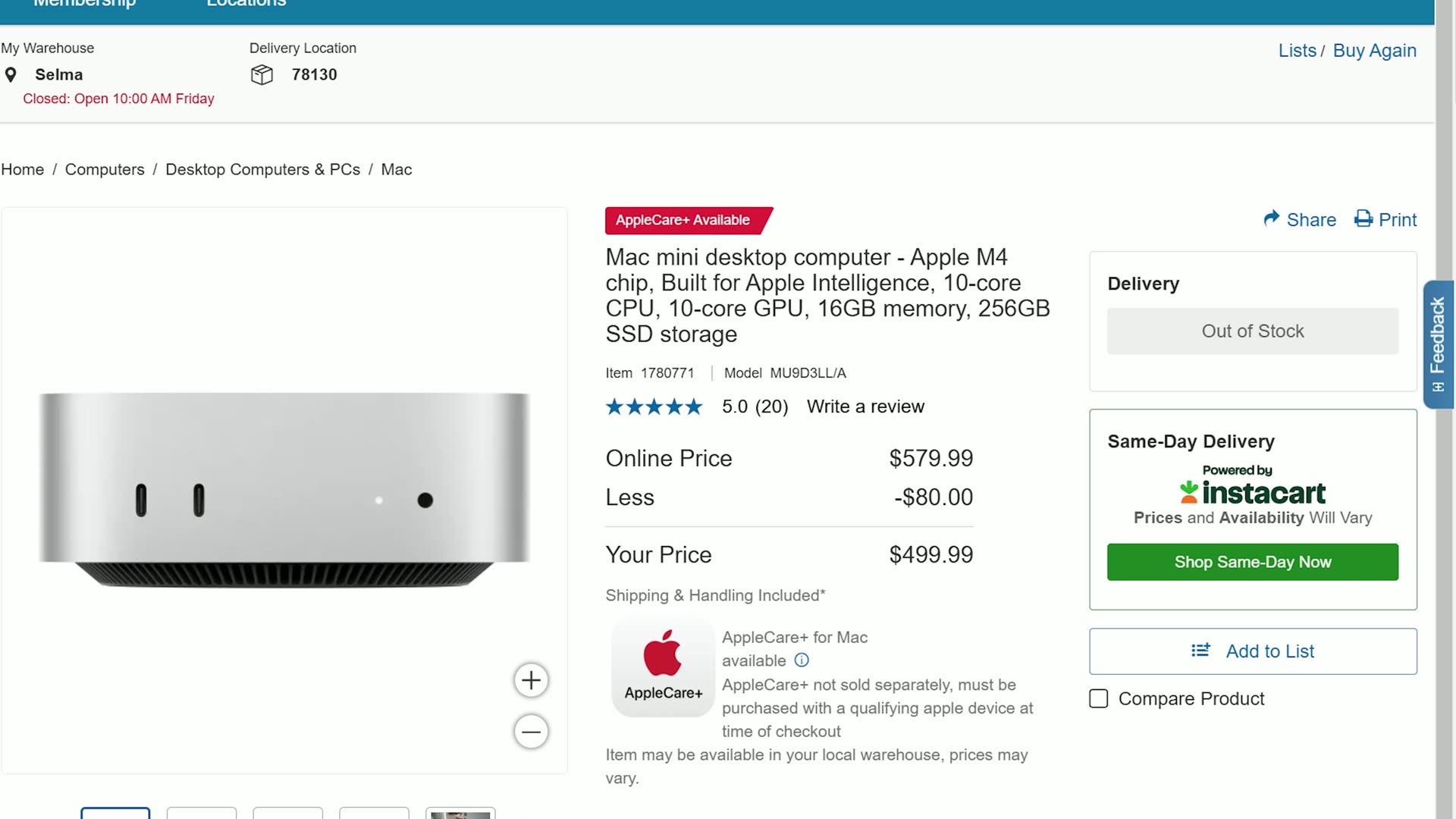
Here’s my rule: the used M4 Mac Mini is only your budget option if you can find one for about $600 or less. And they are out there, because earlier this year Amazon and Costco were selling this exact computer, 16 gigs of memory and a 256 gig SSD, brand new for 500 bucks. So plenty of people are gonna be selling theirs to upgrade to the M6, and then you can slide into those DMs and say, yeah, I’ll buy that one. Great!
I’m linking to every store I can find the M4 Mac Mini in stock at an affordable price. But if the best you can find is $700 or $750, skip it and just buy the new M6. If you want the full breakdown on that older machine, I have a whole M4 Mac Mini buyer’s guide for video editing as well.
The Best Bang For Your Buck: The $899 Base M6 Mac Mini
This is the computer I think most of you should buy. It’s the base model M6 Mac Mini with 16 gigs of memory and a 256 gig SSD for $899 from Apple, or at the time of recording this, $879 on Amazon as well as Costco. And if you’re a student or a teacher, $799 through Apple’s education store.
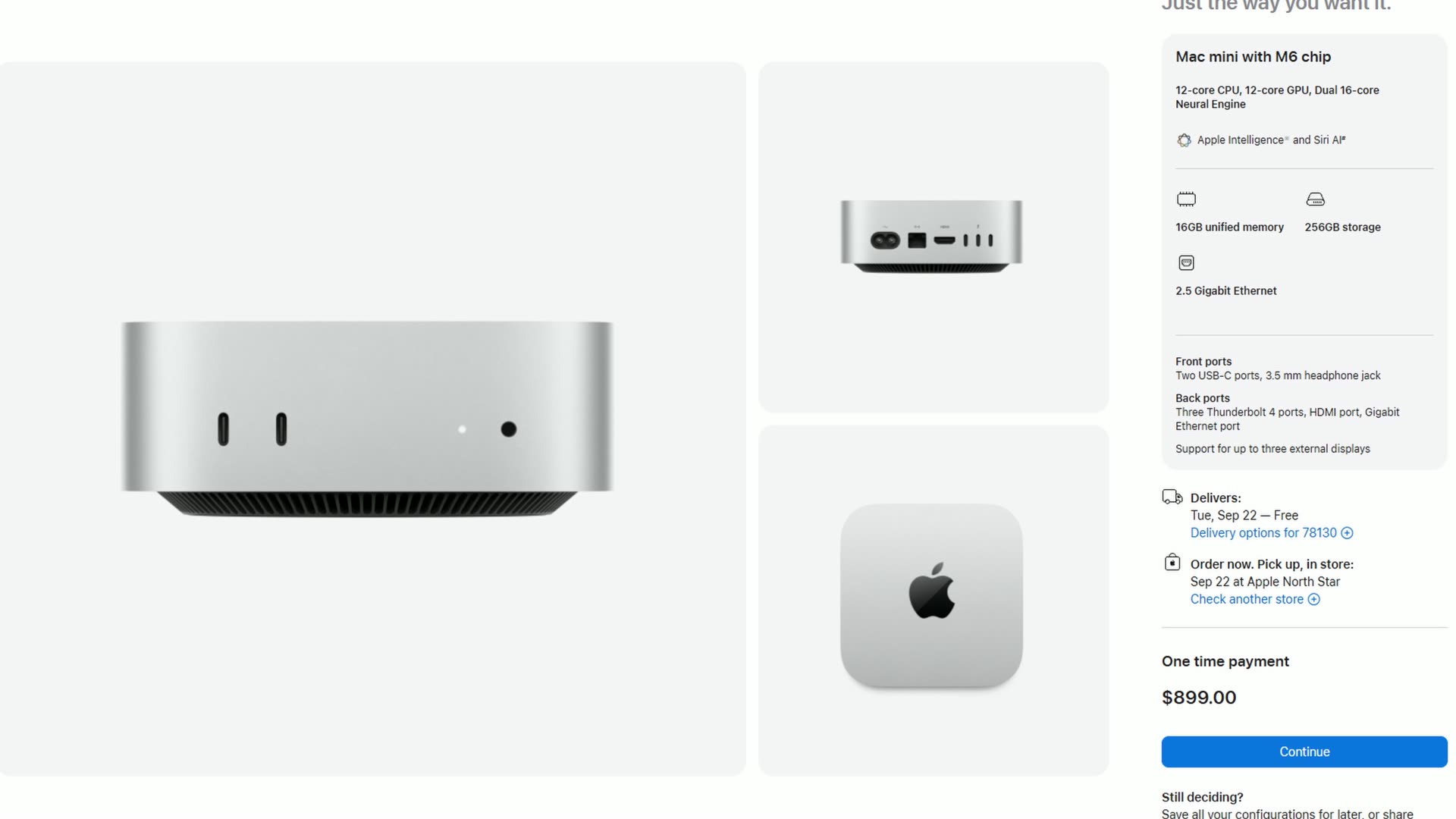
I know $899 for a base Mac Mini stings whenever the M4 Mac Mini launched at $599. But let me tell you what you’re actually getting for that money, because this is the first Mac Mini with Apple’s new M6 chip. It’s their first two nanometer chip, and it comes with a 12-core CPU and a 12-core GPU, which is two more of each than the M4. Apple is claiming up to 40% faster CPU performance and two times faster graphics than the M4.
To put that in perspective, that’s right around where last year’s M4 Pro Mac Mini was sitting, and that computer cost $1,400. So yes, the base price went up, but the base performance went up a lot. For 4K video editing in Premiere, Resolve, or Final Cut, this M6 Mac Mini is gonna work phenomenally right out of the box!
The 256GB Storage Problem
If the base model M6 Mac Mini has one limitation, it’s storage space, because it still only comes with a 256 gig SSD.
To be clear, that is plenty of space for your operating system and your video editing programs. But I would not recommend ever putting your video files on that internal SSD and editing from them at that size, because once you fill up the SSD it’s gonna slow down the rest of the computer.
My recommendation in the past was to buy an external SSD and edit from that instead, since it’s still very fast over Thunderbolt and cheaper than what Apple charges. The two I point people to are the Samsung T7 portable SSD and the faster Samsung T9. But the market has shifted and SSD prices are crazy expensive right now, so sometimes it’s actually a better deal to just upgrade the SSD internally. Which brings us to the third recommendation.
The One Upgrade Worth Paying For
This one is for you if you have a bit more to spend and you want this Mac Mini to last you longer. The good news is we’re still gonna be using an M6 chip, so here’s the upgraded M6 Mac Mini I’d actually pay for.
Upgrade the memory from 16 gigs to 24 gigs. That costs $200, and it is completely worth it. Not just because more memory is nice, but because in the M6, the 16 gig version runs its memory at 153 gigabytes per second, while the 24 gig and 32 gig versions run at 170 gigabytes per second. So that $200 doesn’t just give you more memory, it gives you faster memory. And that is exactly what you want whenever you’re stacking multiple 4K clips on a multicam timeline or running a bunch of noise reduction.
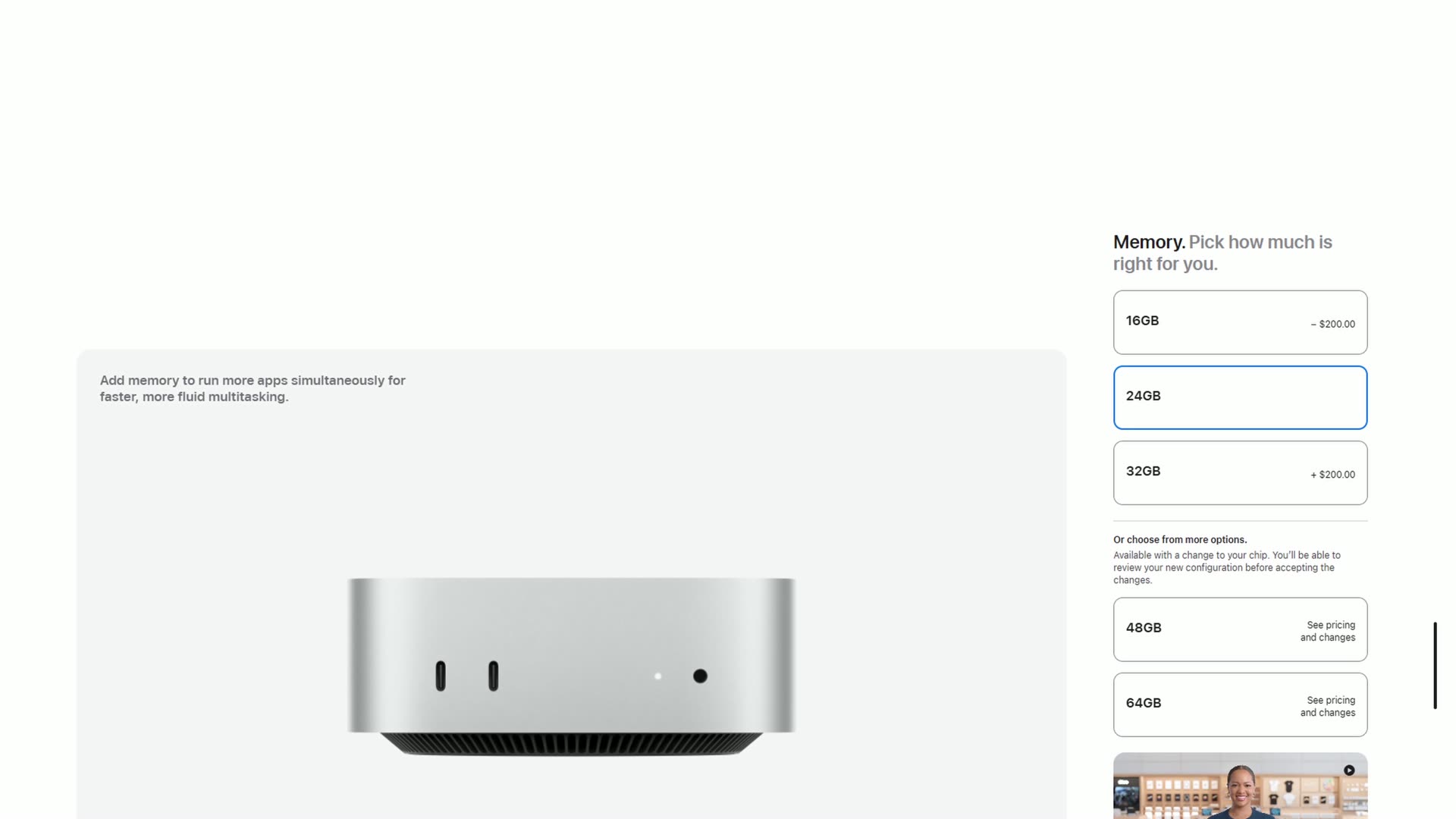
To be clear, don’t bother going to 32 gigs. That’s another $200 for the same memory speed, and it’s just pushing you toward a different computer entirely.
Then for storage, if you want a bit more breathing room on the internal drive, the bump from 256 to 512 gigs is another $200, which puts you at $1,300 total. Honestly, that’s about where I would stop. If you absolutely refuse to use an external SSD you can go to one terabyte, but that’s a $500 upgrade and now you’re at $1,600. Remember that $1,600 number, because we’re about to talk about why you should be careful past that point.
What About The M5 Pro Mac Mini?
I’m sure you’re thinking, Matt, the M5 Pro Mac Mini starts at $1,700, it comes with 24 gigs of memory and a 512 gigabyte SSD standard, it has a 15-core CPU and a 16-core GPU, twice the memory bandwidth, and Thunderbolt 5 instead of Thunderbolt 4. So surely that’s the one you want for video editing, right?
Here’s where I need you to remember something I’ve been saying in my buyer’s guides for a couple of years now. For video editing, the thing that matters most isn’t the number of CPU cores, it’s the video encoder and decoder engines that Apple builds into the chip, because those are what render your videos and play back your timeline smoothly.
So whenever you look at Apple’s spec sheet, the M6 Mac Mini has one video encode engine, one decode engine, and one ProRes engine. And the M5 Pro Mac Mini has, dun dun dun, one video encode engine, one decode engine, and one ProRes engine. It is the same!
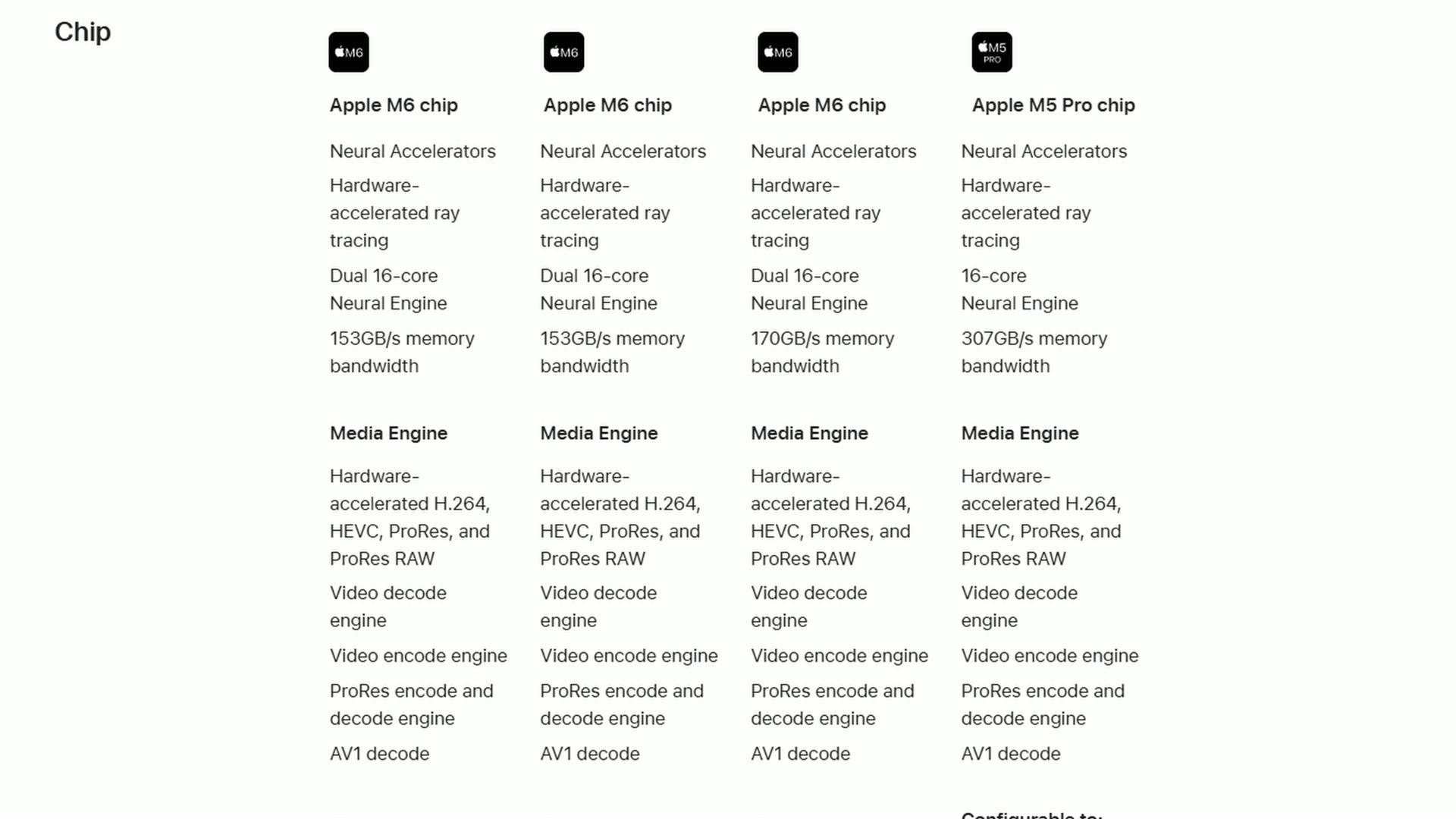
So yes, the M5 Pro will be faster in that it has more cores and more bandwidth. But for 4K editing of H.264 and H.265 video, it is not a massive jump, and you may not even notice it. You’re just throwing $400 more than the $1,300 M6 at it to get there.
When A Mac Studio Beats A Mac Mini
Throw that one terabyte SSD on the M5 Pro and suddenly you’re sitting at $2,000. That’s the problem, because at $2,000 you’re only $500 away from the $2,500 base model Mac Studio with the M5 Max chip.
That’s gonna give you two video encode engines and two ProRes engines instead of one, plus 36 gigs of memory, and that is a truly massive jump in performance. That’s the computer I recommend for editing 6K and 8K raw footage, maybe from something like the Sony FX5. I actually put that idea to the test in my piece on whether your computer can edit Sony FX5 RAW.
Not to mention there are a lot of used Mac Studios out there with Max tier chips, and those chips also have two encode engines. You can oftentimes find them for the same price or less than an M5 Pro Mac Mini. I go deeper on all of those configurations in my Mac Studio buyer’s guide for video editing.
So here’s the rule. If you can stick to the $899 base M6 Mac Mini, do it! Spend $400 more for the memory and the 512 gig SSD if you want, and stop there. Past about $1,600, every dollar you put toward a Mac Mini is a dollar you should probably be putting toward a Mac Studio instead.
How To Get An M6 Mac Mini Cheaper
There are a few ways to get this thing for less, which makes it an even better deal.
Both Amazon and Costco are already taking $20 off the base model, so it’s $879 at either one.
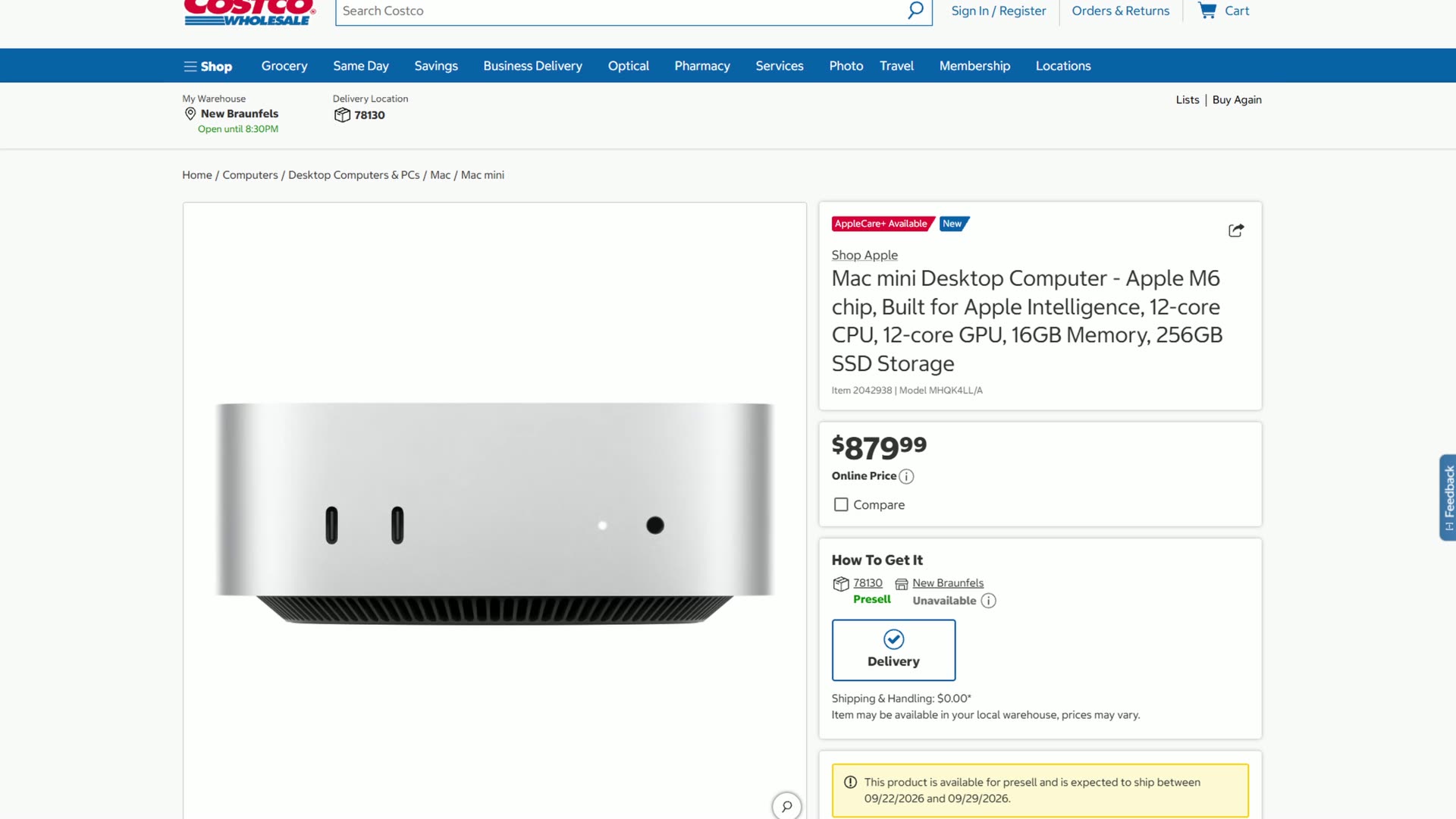
I’d keep an eye on Costco in particular, because whenever the M4 Mac Mini came out it dropped very quickly to $499 there, which was $100 off the cost of a brand new Apple product. That’s wild!
If you’re a student or a teacher, Apple’s Education Store has the base M6 for $799 and the M5 Pro for $1,599, and that’s $100 off all the time. And while it’s not available at the time of making this, I’d expect the M6 Mac Mini to show up on Apple’s refurbished website in a few months, which can give you an even bigger discount. So depending on when you’re reading this, check there too.
Oh, and if you’re upgrading from an older Mac, check Apple’s trade in value before you sell it yourself. It’s the easiest way to knock a chunk off the price. I was shocked whenever I traded in my M4 MacBook Air for an M5 MacBook Air. I was like, I’m gonna get this thing almost for free! Not really for free, but that’s why I told my wife to get it. It was a really, really solid deal.
One quick note on upgrades, because I know somebody’s gonna ask. Apple will upgrade that 2.5 gig Ethernet to 10 gig Ethernet for $100, and I’d only do that if you’re editing from a NAS or you have very fast fiber internet. If that’s you, here are 3 reasons why you need a NAS for video editing.
What About Accessories?
Keep in mind that the M6 Mac Mini does not come with a mouse, a keyboard, or a monitor. So budget for those. Here’s everything I point people to, from the budget options that keep your total price as low as possible up to the upgraded ones that are my personal favorites:
- Logitech MX Keys S wireless keyboard
- Logitech MX Master 4 wireless mouse
- Creative Pebble V2 desktop speakers
- BenQ PV3200U 32 inch 4K editing monitor
- MSI 27 inch 4K QD-OLED monitor
- Dell UltraSharp 32 inch 4K QD-OLED monitor
- Dell UltraSharp U4025QW 40 inch ultrawide
- Dell 52 inch Thunderbolt hub monitor
- Samsung T7 external SSD
And if you’ve read this whole thing and you’re still not sure which Mac is right for you, I have a lot more buyer’s guides on the channel. There’s the M5 MacBook buyer’s guide for video editing, the M5 MacBook Pro guide, and plenty more. We have so many options here!
Last thing. If you want to actually get better at the editing part, grab my free Edit Videos Like A Pro guide. It covers some of the most important things it took me years to learn as a video editor, and regardless of which editing software you use, I know it’s gonna help you be a better editor too.