
If you want to buy an Apple M4 Mac mini for video editing, I have two recommendations for you at two different price points. A best bang for your buck budget option, and a much more powerful one that will handle just about any kind of video you throw at it. Plus we need to talk about which upgrades are actually worth the money if you have the budget, and which ones absolutely aren’t. Sound cool?
To save you time I’ve linked to both of the exact Mac minis I recommend below, along with the keyboards, mice and monitors I recommend, because spoiler, the Mac mini does not come with any of that in the box and you’re going to have to buy it separately. Some of those links also go to the places where I found the absolute cheapest price, so I’d check all of them before you buy.
The Best Bang For Your Buck Mac Mini
If you want the best value Mac mini that will easily handle editing 4K video filmed in H.264 or H.265, which is what most cameras shoot these days, this may be the easiest computer buying decision I have ever had to make. Just get the base Mac mini with the M4 chip for $600.

I cannot overstate the value you’re getting at this price. And what’s crazy is that you don’t have to do a single upgrade to it out of the box. It’s going to work phenomenally. In past Apple buyer’s guides I always had to recommend that people spend extra money on an upgrade, and spoiler, it was almost always the memory, because earlier M series Macs came with only 8GB on the base model. But with the M4, Apple has finally bumped that to 16GB, which is really the sweet spot for budget video editing. So where I used to have to tell people to spend about $800 on a previous generation mini with upgraded memory, now you don’t. Everything you need is already in the cheaper base model, which is great.
If this base model has one limitation, it’s storage, because it only comes with a 256GB SSD. To be clear, that’s plenty of room for your operating system and your editing programs. But I would never recommend putting your video files on that internal SSD and editing off it, because once you start filling it up it slows the whole computer down dramatically. Instead, invest in an external SSD, which is still going to be very fast and which you can get for dramatically less than the $200 Apple charges to upgrade the internal drive.

As far as other optional upgrades go, the only one I’d even consider is the $100 jump to a 10 Gigabit Ethernet port on the back, and I’d only do that if you have very fast fiber internet or you’re planning on editing video off a NAS. Otherwise, the closer you can keep this Mac mini to the base $600 price, the better.
An Even More Powerful Video Editing Mac Mini
My second recommendation is for you if you have significantly more money to spend and you want your videos to edit and render faster than the base M4 chip can manage. Consider this one if you’re commonly editing 4K but occasionally working with 6K or 8K footage, or footage shot in a beefier codec than H.264 or H.265.
To be clear, if you’re editing exclusively 6K or 8K or raw footage, I can’t really say a Mac mini is the best choice even with the M4 Pro, and you may want to look at a Mac Studio with one of the Max chips instead. Spoiler, I have a recommendation for that later on.
Now, what you do not want to do is go to Apple’s configurator page and max everything out for about $4,700. That’s wild. No. Don’t do that.

Instead, you want the cheapest Mac mini that comes with the M4 Pro chip, which at the time of recording comes in right at $1,400. For that you get an M4 Pro with a 12 core CPU and a 16 core GPU.

You’ll notice there’s an upgrade to a 14 core CPU for $200, but in all of my research the jump from 12 to 14 cores is pretty darn negligible in terms of video editing speed and performance, so I’d save that $200 and either keep it or spend it on something else.
One nice benefit of going M4 Pro is that memory also gets bumped by default from 16GB up to 24GB, which helps with higher quality footage. If you’re editing a lot of material above 4K you may want to consider going to 48GB for $400, but I have a warning about that in a second.
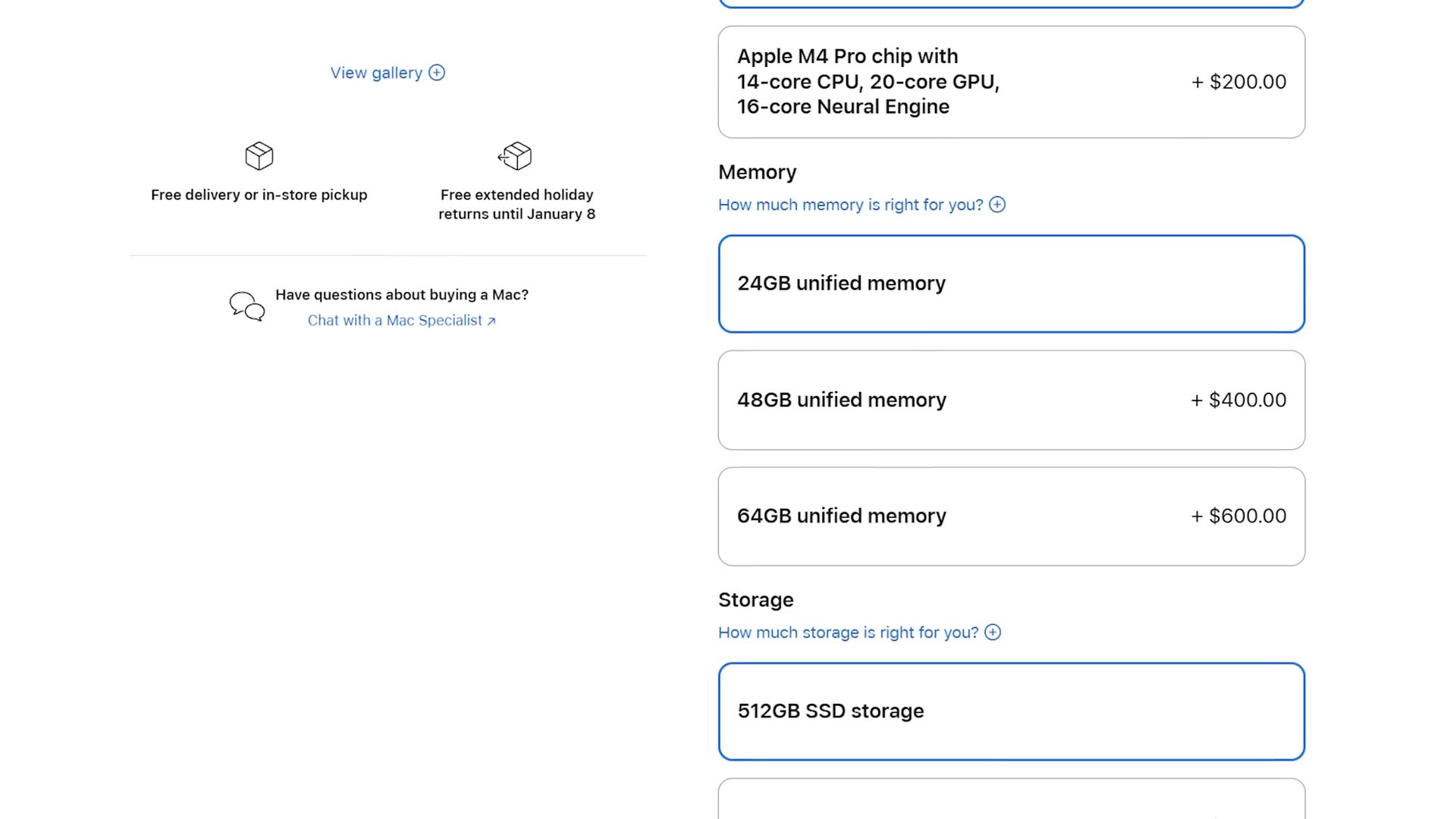
Storage also gets bumped to a 512GB minimum SSD with the M4 Pro, which again is plenty for your operating system and your programs. But even at 512GB I’d still recommend editing off an external SSD, both to keep that internal drive free so the computer stays fast and because the cost of Apple’s internal storage upgrades climbs very quickly.
Side note: whenever people got their hands on the M4 Mac mini and took it apart, they discovered it actually has a removable SSD. I’ve read that a company is now working on their own replacement modules, which I’m betting will be cheaper than what Apple charges. It’d be significantly more work and it would require taking your Mac mini apart, but there’s real potential to upgrade the SSD yourself down the road and save some money. And that’s a rarity these days with Apple, so keep it in mind.
The Warning About Upgrades
Here’s the reason I’m recommending this exact $1,400 configuration and not one dollar more. Once you start buying upgrades, say you go from 24GB to 48GB of memory because you’re editing a lot of 6K or 8K, that upgrade costs $400 and brings the M4 Pro Mac mini up to $1,800.
Speaking of which, Video Editing Mac Studio Buyers Guide 2025, Video Editing Mac Studio Buyer’s Guide in 2022, and Video Editing M4 Macbook Pro Buyers Guide 2025 are worth a look too.
Which is still a great deal compared to other M4 computers Apple currently sells, like the M4 MacBook Pro. But once you start looking at earlier generations of Apple computers, which are still very powerful, that’s where you want to pause and think about how you’re spending your money.
The Mac Mini Alternative
Because while you could buy the M4 Pro Mac mini with upgraded memory for $1,800, you could also go to B&H and buy a brand new Mac Studio with an M2 Max chip for $2,000. And I’ve seen it on sale for $1,800, the exact same price.

And to be clear, as fast and as modern as the M4 Pro chip is, the M2 Max is still going to be dramatically faster for video editing. Do you see what I’m saying? The M4 Pro Mac mini is a good deal at $1,400, but the closer you get to $2,000 the less of a good deal it becomes, and you’d be better off with a Mac Studio. Please keep that in mind. I want to make sure you get the best computer you can for your money.
How To Get A Mac Mini Cheaper
There are ways to get either of these for less, which makes them an even better deal.
- Check Costco. I’ve seen the base mini for $500 instead of $600, which is kind of mind blowing for a brand new Apple product. And I’ve seen the exact M4 Pro configuration I recommend on sale there for $1,270.
- Apple’s education store. If you’re a student, the base mini has been $500 there, and the education discount takes $100 off the M4 Pro too, bringing it to $1,300.
- Apple’s refurbished site. The M4 mini wasn’t there at the time of writing, but I’d expect it sooner rather than later, and that can be an even bigger discount.

While $100 off didn’t used to be much in the world of Apple, back whenever their computers cost thousands upon thousands of dollars, suddenly having a Mac mini that’s significantly cheaper on sale right after it was announced is kind of crazy.
Even with those discounts though, you could still buy two of the base M4 Mac minis for the price of one M4 Pro. And if you catch the base model on sale at $500, you could almost buy three. Which is absolutely wild, and which really just emphasizes what a fantastic deal that $600 or $500 base model is.
So the choice is up to you, but personally, at such an insane price, I would pick up the base M4 Mac mini and test it with your own editing. Worst case, if it isn’t fast enough you return it and upgrade to the M4 Pro. But I’m betting you get the base model and you’re really happy with it.
What About Accessories?
Remember, the Mac mini does not come with a mouse, a keyboard or a monitor. Here are the budget options to keep your total as low as possible, plus the upgraded ones that are my personal favorites.
- External SSD for video editing: on Amazon
- High quality monitor: on Amazon
- Budget keyboard: on Amazon | my favorite keyboard: on Amazon
- Budget mouse: on Amazon | my favorite mouse: on Amazon
And here’s where to buy the computers themselves:
- Budget M4 Mac mini: Amazon | B&H | Costco
- Powerful M4 Pro Mac mini: Amazon | B&H | Costco
- The more powerful alternative: Mac Studio at B&H
Want To Edit Faster?
I’ve also put together a guide called Edit Videos Like A Pro, which shows you the most important things that took me years to learn as a video editor. Regardless of which editing software you use, I know these tips are going to help make you better. You can check it out completely for free right here. Thanks so much for reading and have a great day!