
The Sony ECM-W5 is the first wireless mic I’ve ever used that can record 32-bit float audio straight into your camera, it lets you monitor your audio with Bluetooth earbuds you may already own, and it has a timecode trick that only works because Sony makes the camera too. Because I respect your time, I’m gonna spoil my conclusion right now: if you film on a Sony camera, this is my new go-to mic recommendation, and I think it’s gonna replace the Hollyland Lark Max 2 as the mic I use the most. But there are a few things I want you to know before you buy it.
So below, I’m gonna answer four questions for you. First, what can this mic do with a Sony camera that no other mic can? Second, and this one really threw me off, what is the one setting that will make you think headphone monitoring is completely broken, even though it isn’t? Third, how does it actually sound, and did it hold up whenever I used it at a real wedding? And lastly, is the W5 worth the money, or should you save some cash and get something else?
Also, for the sake of ethics, I want you to know this review is not paid or sponsored by Sony, but they did loan me this mic system so I could make it, they had zero input on it, and by the time you read this I will have sadly already sent the whole system back to them.
Cornering Sony’s Engineers At Kando
Every year Sony has an event called Kando that I’ve attended, and one of my favorite things about it is that a lot of Sony’s engineers fly out. It’s wild, because you’ll be at dinner and a nice guy from Japan will introduce himself, and you realize he literally made the 24mm lens that you love. It’s a very surreal experience!
More than just meeting these engineers, for me it’s a chance to give them feedback, and I’m not joking when I tell you that for the last couple of years I’ve been accosting random Sony engineers at Kando and telling them they need a pro wireless microphone system for filmmakers. I’m not the only one doing this either, I have friends who tell them the same thing.
And hold up before you type an angry comment at me: yes, I know Sony has pro microphones, I’ve reviewed them. What I mean is an ultra compact wireless mic system like the Hollyland Lark Max 2, the DJI Mic lineup, or the Rode Wireless Pro. Sony did make a similar wireless mic called the ECM-W3, but it really feels more prosumer, which left a gap they needed to fill with a fully pro option.
Thankfully, the W5 is by every definition a pro level microphone system, and I’m so glad they listened, and more than that, really worked hard on a system that leverages a lot of their strengths across their different audio products. I’ll explain what that means in a second.
What’s in the box with the Sony ECM-W5?
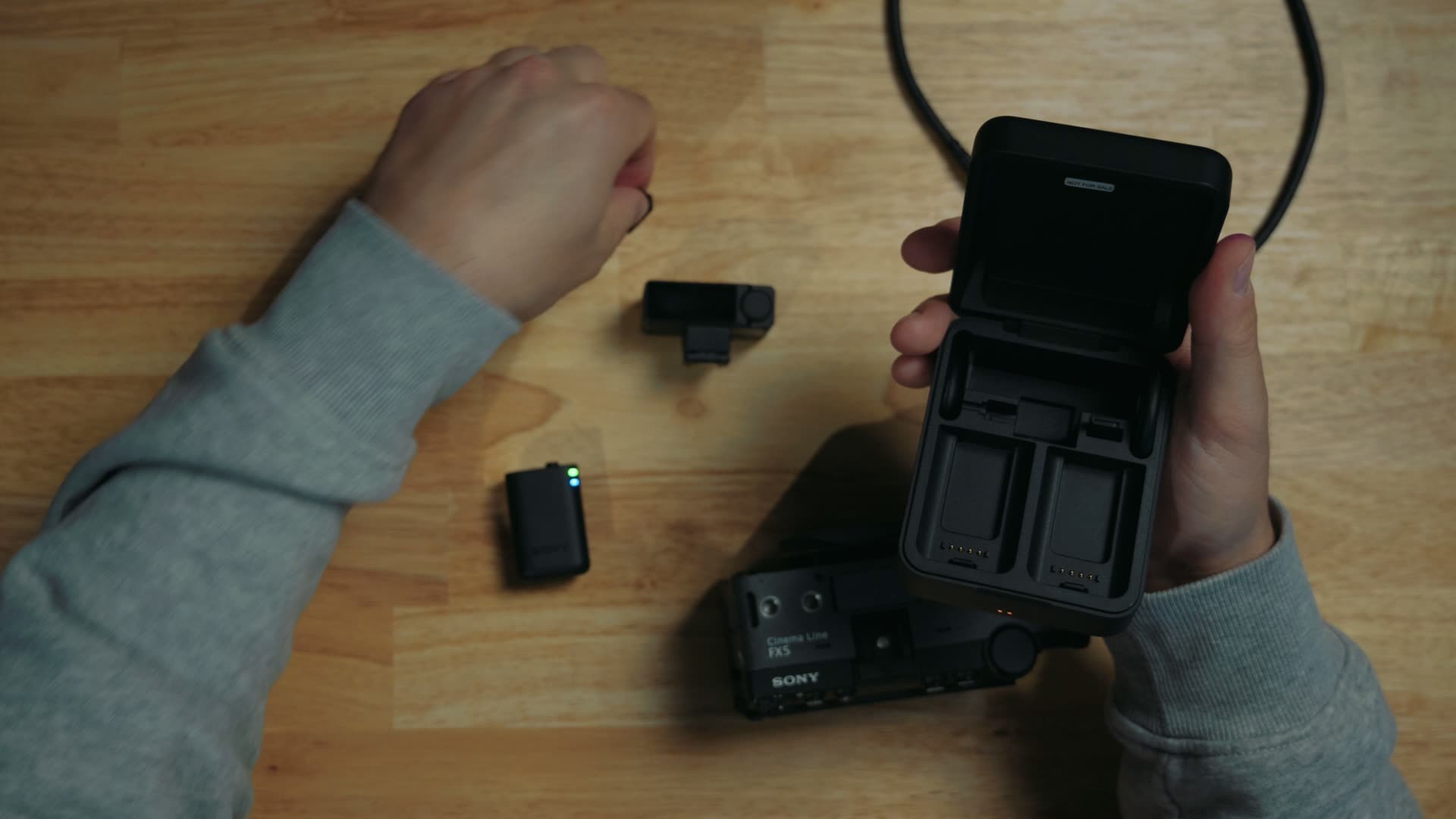
Design wise, the W5 is similar to a lot of the competition. It comes in a clamshell charging case that kind of feels like you could propose with it. It looks like a ring box, right? I have filmed way too many weddings at this point, my goodness!
Anyways, inside you get two transmitters, a receiver with both a camera hot shoe connection and a smartphone connection, plus some magnetic discs that will mount the transmitters if you don’t want to use the clips built into the back of them. Sony also sells a couple of other versions with more or fewer transmitters and receivers, and you can find the all the W5 kits and bundles here.
Wireless Monitoring With Your OWN Earbuds
Cool, Matt, this looks like a lot of other microphones. But remember, Sony is a company that makes more than just cameras. So what’s one thing so many filmmakers have been asking for with all of these newer wireless systems? The ability to monitor audio wirelessly, and so far that has been a very mixed bag.
Most companies don’t let you do it at all. The only one that comes to mind that works reasonably well is Hollyland, and in my full Hollyland Lark Max 2 review you’ll see they included a set of in-house wireless earbuds that pair with the system so you can monitor your audio.
Sony, on the other hand, is a very large company that already has a headphone division, so they fully understand all aspects of Bluetooth. And they said, “Hey, you don’t need to buy a specific Bluetooth headset, you can pair the headphones you may already own with the W5 and monitor your audio wirelessly.” Which sounds fantastic, right? Most people already own a set of Bluetooth headphones, so it makes a lot of sense, and it’s a very robust way to make sure you’re recording high quality audio.
The Setting That Makes Monitoring Look BROKEN
Now, that said, here’s the setting I promised you, and it really threw me off whenever I first used it. You may connect your headphones to the receiver and they just won’t work. That’s very confusing, because the receiver and the headphones will both say they’re connected, but you won’t hear anything.
The way you can tell something’s wrong is the receiver screen. If it says your headphones are connected via classic audio, that’s the problem, and it will not allow wireless monitoring.
And here’s the big catch. The only way you can use wireless monitoring is with headphones that support Bluetooth Low Energy audio, aka Bluetooth LE Audio, and they have to be connected to the receiver in that mode. Thankfully, LE Audio is becoming a much more common format for audio streaming, but you will need to check whether your specific headphones support it.
In my case, Sony sent along a pair of their new Sony WF-1000XM6 earbuds with the mic, and they include LE Audio streaming support. Once LE Audio is enabled, these earbuds pair virtually instantly with the receiver, with basically no lag.
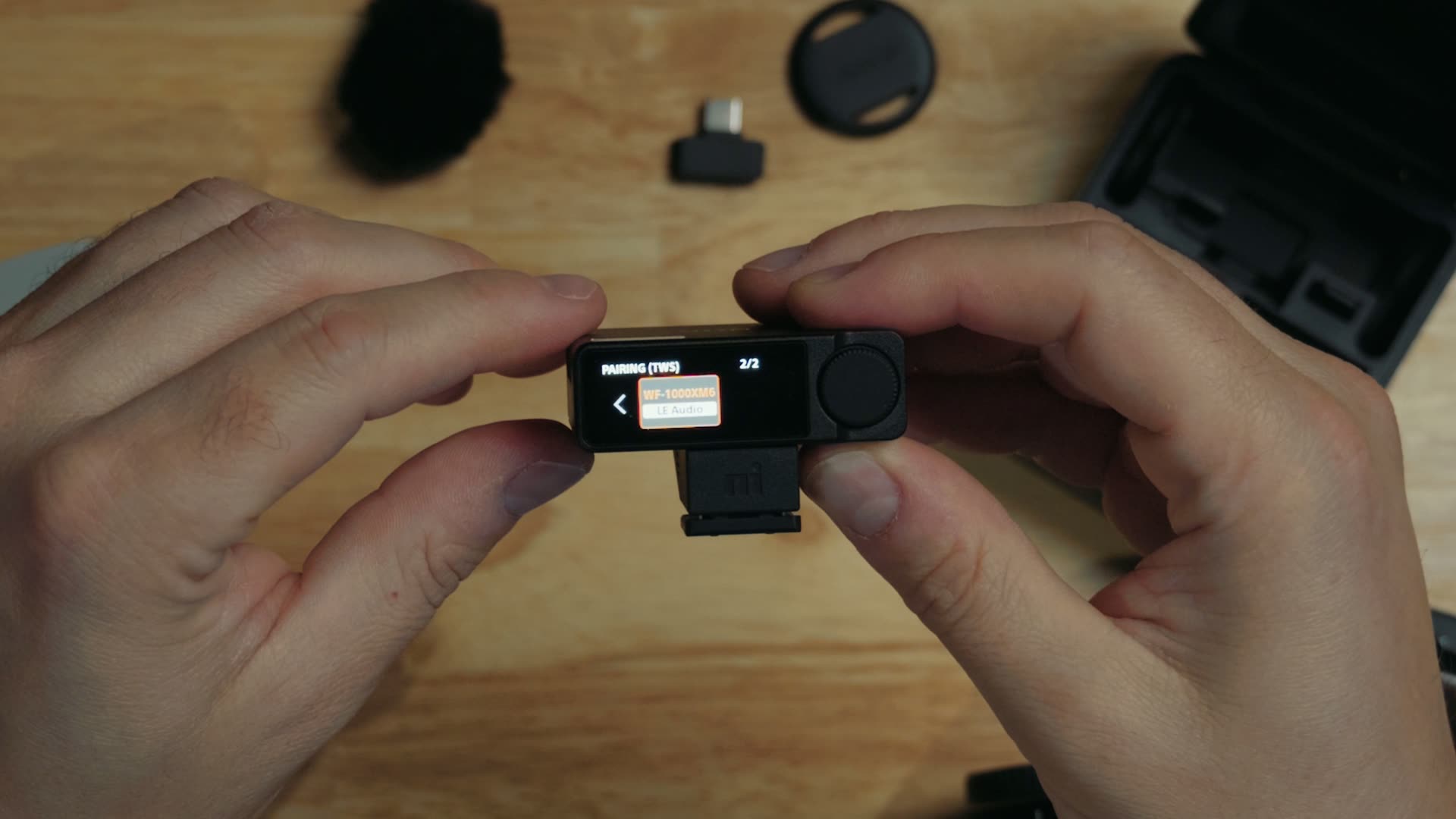
You could easily bring some earbuds to a wedding and keep one in your ear while you walk around monitoring your audio as you film, which is exactly what I did. It is so great!

To help you out, here are the headphones and earbuds I recommend for this, including some cheaper options to help save you money:
- Sony WF-1000XM6 (the earbuds I used)
- Sony WH-1000XM6
- Sony ULT WEAR
- Sony LinkBuds Fit
- Samsung Galaxy Buds4 Pro
- Google Pixel Buds Pro 2
- EarFun Air Pro 4
What can the W5 do with a Sony camera that no other mic can?
Which brings us to the next question I promised you. Keeping in mind this system was built by Sony for Sony cameras (to be clear, you can pair it with any other camera brand if you want to), you’ll get the most out of it on a Sony body.
A Case That Holds EVERYTHING
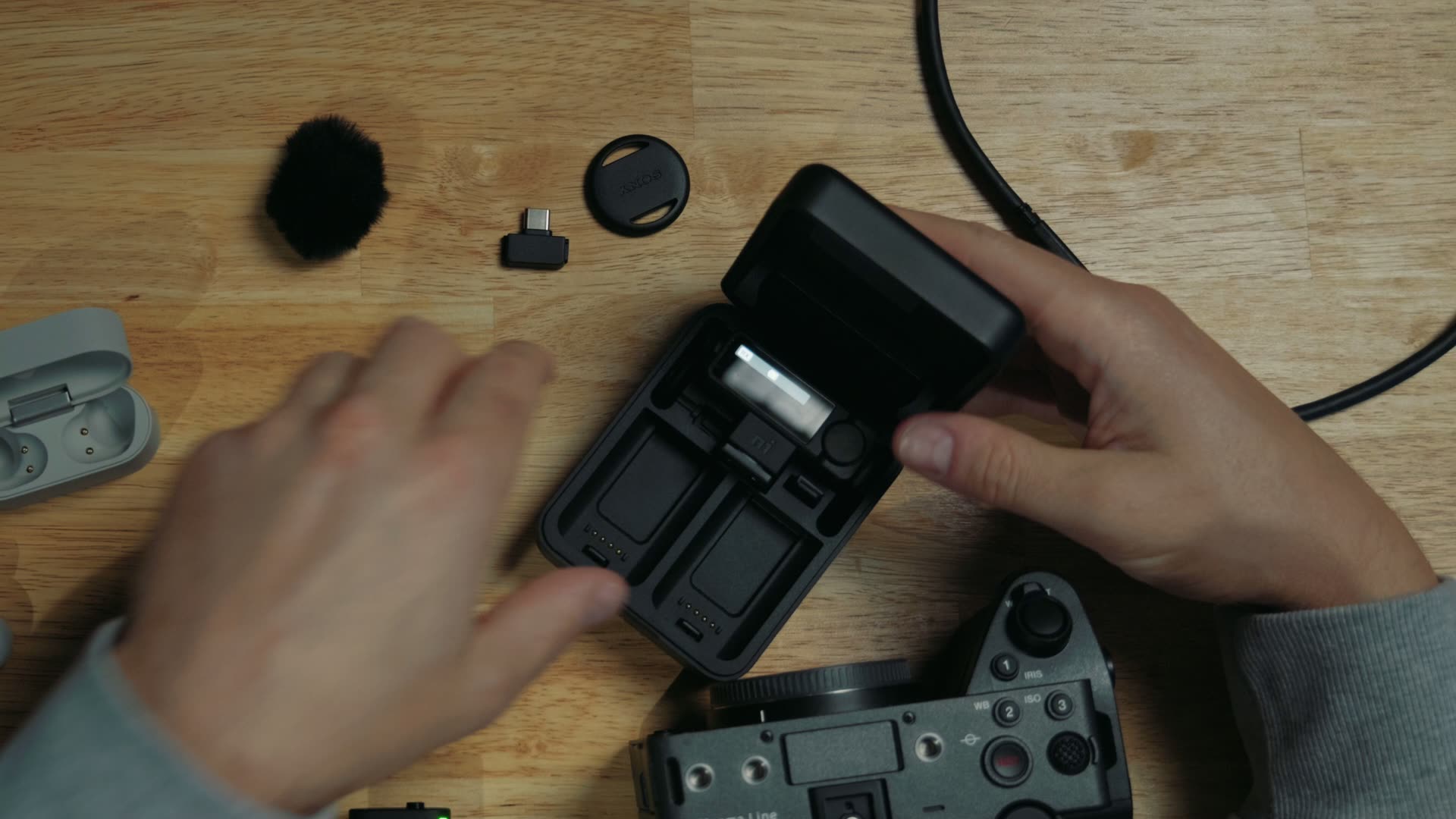
The case is built to hold not only the receiver, but also the hot shoe connector, which I really appreciate. DJI and Hollyland, as well as other mic companies, sell hot shoe adapters that work with Sony, like the Hollyland Lark Max 2 Hot Shoe Adapter and the DJI Mic MI Shoe Camera Adapter, but none of the ones I’ve used came with a case that stores the entire unit. It’s just a very nice way to make sure you don’t lose anything, and I love how this case is laid out.
A Locking Mic Jack, FINALLY
Next, remember we’re talking about pro level features I’ve wanted for a long time. Most of these wireless systems do not have a 3.5mm mic jack on the transmitter. DJI had one on the DJI Mic 2 (I cover it in my DJI Mic 2 review for wedding filmmakers), but then got rid of it on the DJI Mic 3. Hollyland does offer a 3.5mm jack with the Lark Max 2, but to use it you have to attach a USB-C to 3.5mm adapter.
Sony said, “Forget that!” You not only get a mic jack, but even better, this is only the second system of its kind I’ve seen, after the one in my Rode Wireless Pro review, with a locking screw mic jack on the transmitter. That is something you normally only see on pro level microphones.
No Lav In The Box, But GREAT Wind Mufflers
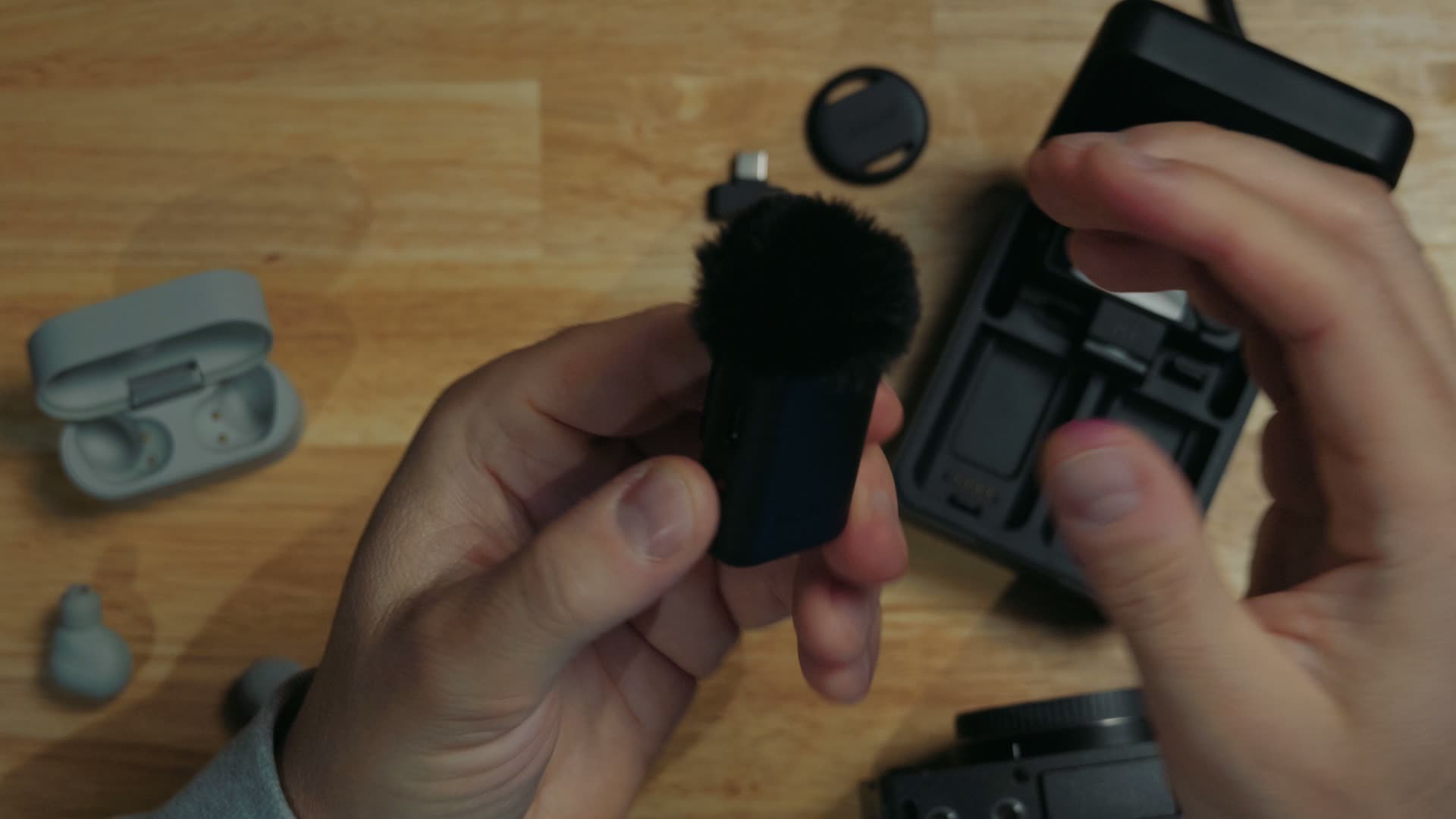
Unfortunately, the system does not come with a lav mic in the box, so you’ll need to bring your own. One thing that does come in the box, though, is a wind muffler for each transmitter, and I have to say, I’ve never seen a wind muffler connector like this. It is really impressive!
To attach the muffler, there’s actually a dummy 3.5mm connector that you insert into the transmitter’s mic jack. Whenever you do that, it mounts perfectly right on top and helps you get better quality audio. It’s a really secure and snug way of doing things. Good job, Sony!
32-Bit Float Straight Into The CAMERA
Now throw in the ability to record 32-bit float audio internally on the transmitter, and you can start to see why the W5 is so great for pros.
But we ain’t done yet! If you have a newer Sony camera that can record 32-bit float internally, which at the time of writing means the Sony a7 V, the Sony a7R VI, or the Sony FX5 I tested it with (here’s my full Sony FX5 review), Sony has unlocked another amazing capability: this system can transmit 32-bit float audio wirelessly and record it directly to the camera.
That saves you from connecting the transmitter to your computer, copying the audio off, and syncing it up in post later. And if you do have wireless signal issues, you still have the 32-bit float recording on the transmitter as a backup. It really is the best of both worlds.
Binaural Audio Is COMING
Sony tells me this microphone will also support binaural audio in a firmware update coming in November 2026. I’m hoping to get my hands back on it to test that. Regardless, if you’re recording video for something like VR, that feature may be very interesting for you.
The BEST Timecode Setup On A Wireless Mic
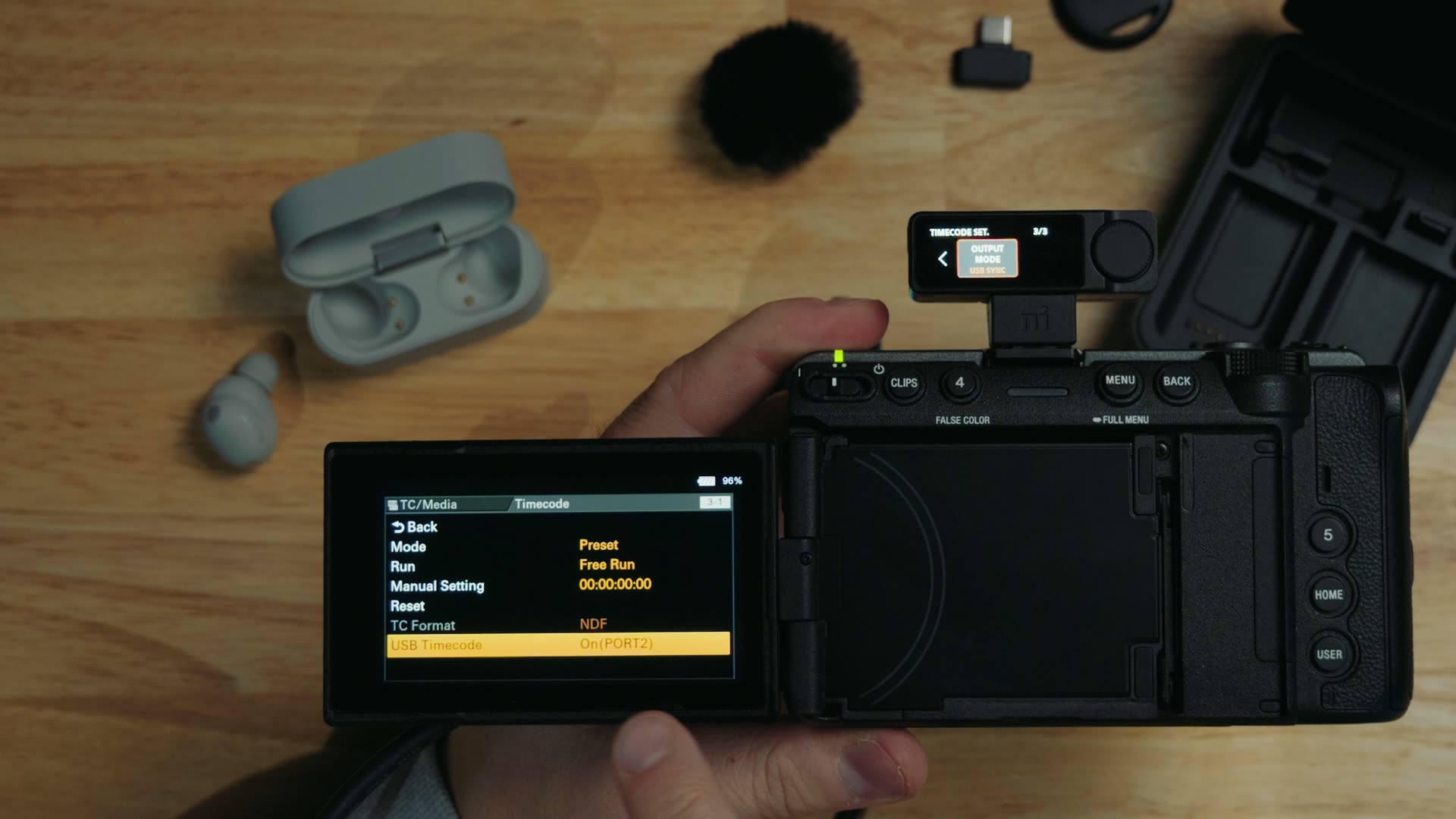
Lastly for Sony unique features, and this is definitely a pro level one, we gotta talk about timecode. I’m not joking when I say this may be one of the best implementations of it in a wireless mic system. With pretty much every other wireless mic like this, only a few support timecode at all, and they make you send it over an audio track.
But because Sony makes the mic system and the camera, you can connect the transmitter to your camera with a regular USB-C cable to send the timecode signal. Here’s how:
- Plug the USB-C cable into the back of the transmitter.
- Plug the other end into port 2 on your camera.
- Power them both on.
- Make sure the receiver is set to USB sync for timecode.
- Turn USB timecode on for port 2 in your camera’s menu.
Do that and your timecode syncs up perfectly between both devices, and it saves you from giving up one of your audio tracks. It is so awesome! If you’re new to working this way, my guide on how to sync audio faster with timecode walks through why it saves so much time in the edit.
Two Timecode LIMITATIONS
At the time of writing, there are two limitations. First, this USB timecode connection only works with the FX5, because it has a specific USB timecode setting you have to enable, but once you turn it on and connect it, it just works. Second, in my testing this system cannot receive timecode, it can only create it, so you’ll need to run timecode out from the mic to all of your other devices. Still, I’m very happy to see Sony implement timecode this way.
How Does It Actually SOUND?
Of course, all of these cool Sony features wouldn’t matter if the audio quality sucked. I’m happy to tell you it doesn’t, and even better, I recorded the entire video above with the Sony W5. So you can think of the whole video as an audio quality test: if you like how it sounds, you’ll like how this mic sounds. All of that audio is 32-bit float at 48kHz, but I want you to know this mic can record up to 96kHz, which is fantastic!
Tested At A REAL Wedding
I also tested the W5 at a real wedding I filmed, and it worked flawlessly. I put one of the transmitters on the groom, and you can hear that audio in the video. There’s a bit of echo in that clip, but that’s from the speaker at the ceremony, not the mic itself.
How long does the battery last?
Sony tells me the system gets 11 hours of battery life, which I think is pretty accurate. Whenever I tested it at the wedding, it easily lasted the entire ceremony, and I think you could record most of a wedding day on one charge.
Is The W5 Worth The MONEY?
That brings us to the very last question I promised you. Sony tells me it’s gonna cost between $390 and $450 depending on the kit and exactly how they price it, which definitely puts it in the premium category.
If you don’t film with a Sony camera, or you don’t need 32-bit float into the camera, timecode, or a locking mic jack, you can save some cash and get the Sony ECM-W3 for $280, or heck, get a DJI Mic Mini for $80 at the time of writing. But if you film on a Sony camera, the W5 is a no-brainer!
Personally, after testing it at a real wedding, I think the W5 will dethrone the Hollyland Lark Max 2 as the mic system I use most often, because I love recording 32-bit float audio, and this records it directly into the camera, which is excellent! You can find the W5 at the best price here.
If you’re filming on the FX5 too, check out my Sony FX5 filmmaking playlist, since I’m always adding to it. And if you want to see all the latest gear I recommend in one list, grab my free Filmmaker Gear Guide, and when it’s time to cut all that clean audio together, my free Edit Videos Like A Pro guide will help you speed up your edits.