
If you’re filming with a Sony a7S III, FX3, A1 or any of the more recent Sony cameras that shoot 10-bit, my favourite picture profile is S-Log3. Set your camera to PP8, change nothing else, go and film.
If you’re using one of those and an older Sony as well, an a7 III, a6600, a6500, or basically anything Sony released before 2020, then set everything to PP8 but change the gamma to Cine4.
There are your settings. I hate it whenever people make me watch ten minutes of video before they finally tell me what to set. But if you want to know why I’m recommending two profiles instead of one, and how to expose each of them properly, keep reading.
PP8, Not PP9
Make sure you pick PP8, which shows the gamut as S-Log3 and the colour mode as S-Gamut3.Cine. Don’t choose PP9, which is S-Log3 with S-Gamut3, because that one is harder to grade.
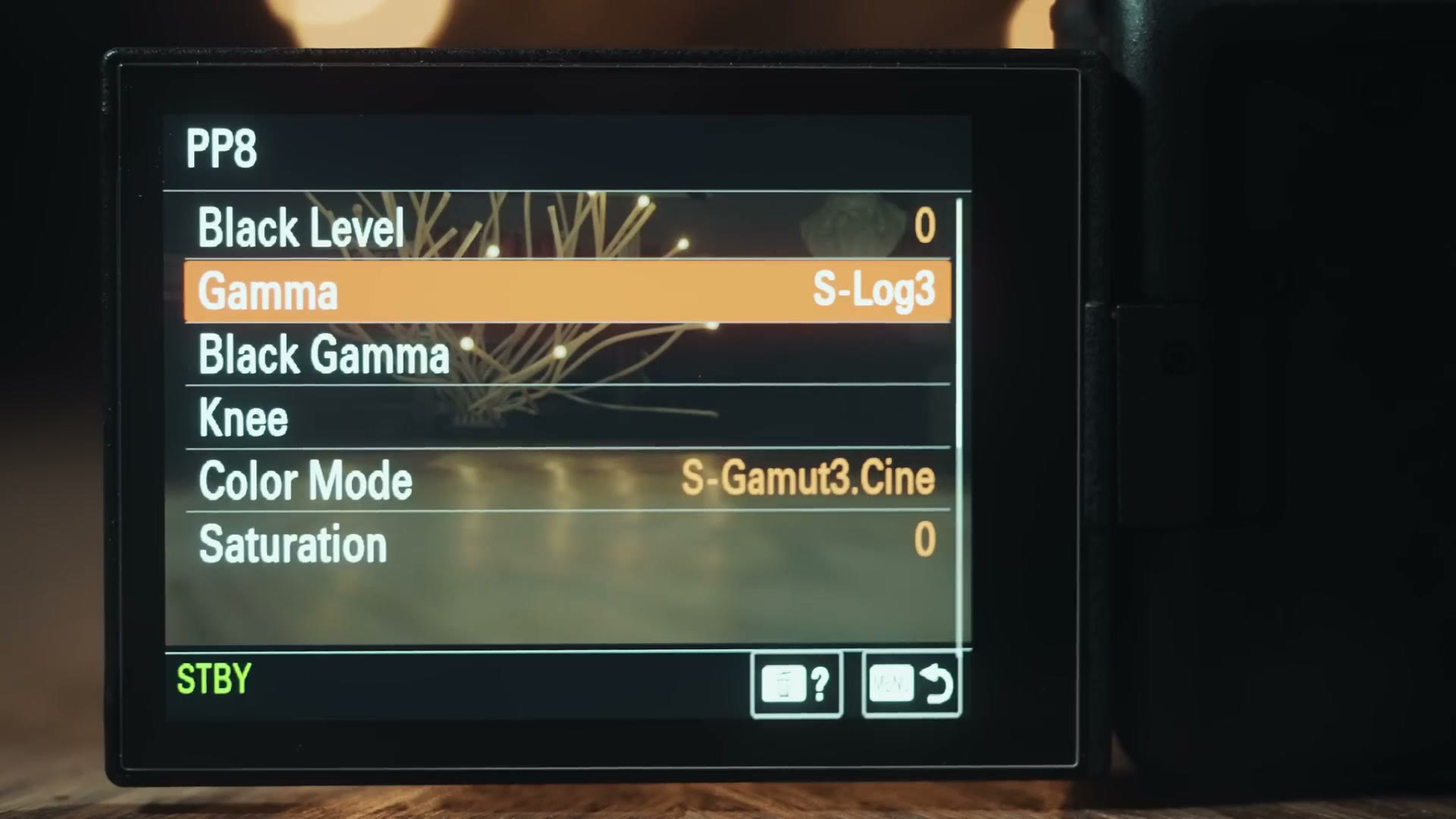
I prefer PP8 because it maximises the dynamic range of these newer cameras and gives you the best footage you can get out of them.
The only downside is that it’s a log profile, which means you have to grade it, adding contrast and saturation, before it looks its best. To make that fast, I built a set of WhoIsMatt LUTs tested specifically against S-Log3.
How To Expose S-Log3
With a normal picture profile you’d traditionally aim to get your exposure as close to 0.0 on the camera’s meter as possible, so the footage is neither too bright nor too dark.
S-Log3 isn’t a normal profile. It’s a log profile Sony built specifically to maximise dynamic range. So instead of targeting 0.0, expose between 1.7 and 2 stops over.
I realise that sounds very bright, and on the back of the camera it will look very bright. The payoff comes in the grade: adding contrast pulls that brightness back down and the image looks great.
If You Shoot Old And New Sony Bodies Together
Now the second profile. Mixed kit, a7S III alongside an a7 III or an a6600, set them all to PP8 and change the gamma to Cine4. Leave everything else alone.
Why not just put every camera on PP8 S-Log3 and call it a day? Colour.
Older Sony cameras like the a7 III record 8-bit video, which is up to 16.7 million colours. That sounds like plenty. But one of the headline features separating Sony’s newer bodies from the old ones is 10-bit, and 10-bit gets you 1.07 billion colours. That is an enormous difference, and it solves a real problem.
Come back in time with me. My a7S II came out in late 2015, and it was one of the first mirrorless cameras Sony shipped with S-Log3, which as I said maximises your dynamic range. Here’s the twist: I never recommended using S-Log3 on the a7S II, the a7 III, the a6500, the a6600, or basically anything Sony made before 2020.
Because those cameras only record 8-bit. Set an 8-bit camera to S-Log3, with its very flat image, and there simply aren’t enough colours to grade it properly. Add contrast and saturation and you start seeing weird lines of colour banding in blue skies and even in skin tones. That made S-Log3 effectively unusable on those bodies.
So back in 2016 I made a video about a picture profile I called MattFlat, which gets you dynamic range close to S-Log3 without the gross banding that made it unusable. And can you guess what MattFlat was? PP8 with the gamma set to Cine4.
Sounds familiar. Here I am years later recommending the same profile again, because it’s still the right answer whenever you’re mixing 10-bit and 8-bit bodies. Set them all to it and they’ll match each other for dynamic range and quality with no banding.
And because I’m betting you’re wondering: no, you don’t need to drop your newer cameras to 8-bit to use MattFlat. Keep them at 10-bit. The extra colour information only helps you in the grade and helps the cameras match.
How To Expose MattFlat
It’s still a log profile, so again, you don’t want the meter reading 0.0. You want it brighter. Here I’d expose somewhere between 0.3 and 0.7 stops over.
You don’t need to go as far as full S-Log3’s 1.7 to 2 stops, but you do want it a bit brighter than normal, and it’ll help you a lot when you grade. My LUTs are tuned for MattFlat too, so they’ll save you time there as well.
What About S-Cinetone?
When Sony announced the FX9 a few years ago it included a picture profile called S-Cinetone, which gives a gorgeous image straight out of camera, meaning you don’t have to grade it at all. The trade is less dynamic range, but plenty of filmmakers found the speed worth it. Sony has since put S-Cinetone in all their newest cameras, including the a7S III, via the 2.0 firmware.
I’ve had a lot of people ask whether it’s my new favourite. In short, no. I do love the colours and skin tones you get from it, but the dynamic range isn’t nearly as good as S-Log3, and if you shoot run and gun like I do, without full control of your lighting, you need the flexibility a log image gives you. So I greatly prefer S-Log3.
To Sum Up
Mixing old and new cameras: MattFlat, which is PP8 with Cine4 gamma. Newer cameras only: I suppose I’ll call it MattFlat 2.0, even though it’s just PP8 S-Log3. You don’t have to call it that. I’ll probably put it in the title so you can find this again.
If you shoot the a7S III, FX3 or A1 and you want all my settings, I’ve written the full walkthroughs, and if you’re on an a7S III specifically you can download my settings file for free and load every filmmaking setting straight into the camera.
And there’s more on the S-Log3 side if you want it: easy S-Log3 settings, colour grading S-Log3, and the older Sony camera picture profile video that MattFlat came from originally.