
If you want to buy a MacBook Pro for mobile 4K video editing in 2020, I have two recommendations for you at two very different price points.
The first is for you if you’re on a budget. It’ll save you money while still giving you a capable machine for 4K, at about $2,600. The second is for higher budgets at $3,900, and it’s for you if you want to edit 4K or higher resolutions like 6K, or RAW video.
I’m making these recommendations with all video editing software in mind, so whether you edit in Final Cut, Premiere or DaVinci Resolve, these will work great for you.
And I realise that if I say “budget” and also “$2,600”, that may not seem like budget to you. But this is Apple we’re talking about, and if you want a powerful device you’re going to have to pay for it. If you can’t swing these prices, I’ve also written up a budget video editing laptop guide with several laptops available today under $1,000 that will edit 4K easily.
Wait For Apple Silicon?
First things first. Apple is planning to transition all their computers from Intel to ARM processors over the next two years, which means you may see better battery life and more processing power once those machines arrive.
So my recommendation is that if you can wait another year or two to upgrade, it may be worth doing so.
That said, don’t be afraid to buy one of the Intel MacBooks I’m recommending here. Apple has said they’ll continue supporting them for the foreseeable future with updates, so I feel comfortable telling you to buy them. If you want to know more about what that transition means, I wrote up why Apple’s ARM silicon Macs are a big deal for video editors.
Skip The Air And The 13 Inch
If you want to edit 4K on an Apple laptop, I would completely exclude the MacBook Air and the 13 inch MacBook Pro from your considerations.
Why? Because even kitted out with the highest end processors available for them, they still aren’t going to handle video editing well, from either a power or a heat perspective. They also don’t include a dedicated graphics card, which for video editing is essential, especially at higher resolutions.
Those smaller machines handle quick, bursty work like spreadsheets and web browsing fine. But once you throw video editing at them, where the processor is forced to work continuously as it plays video, the computer starts to overheat and throttle back performance, and you will not be nearly as productive.
So the only Apple laptop I recommend for video editing is the 16 inch MacBook Pro.
The Budget Build
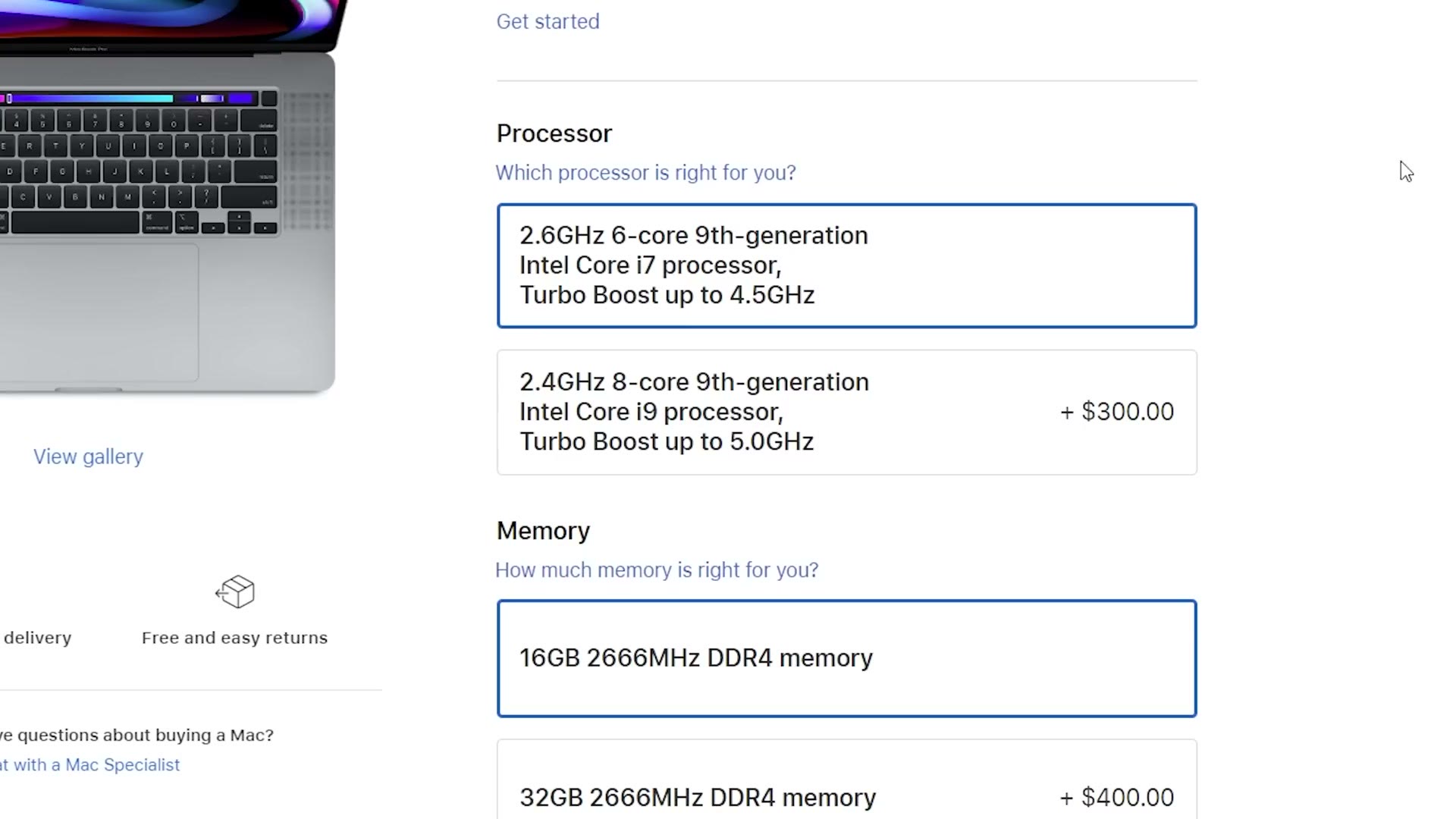
Starting with the cheaper configuration, I’d go with the 6-core 9th generation i7 with 4.5GHz turbo boost. That’s the minimum I would recommend for 4K, but if 4K is all you’re doing and you aren’t planning on 6K or RAW, you should be fine.
For memory, 16GB. Again, for 4K that should be plenty, but be aware it’s going to be difficult to multitask with that much. If you want to be editing video while browsing the web, watching YouTube and editing an image in Photoshop, you’re probably going to run out. If you multitask, upgrade to 32GB. But this is the budget option, so I’d stay at 16 to keep the price down.
Also keep in mind that Apple does not let you upgrade the memory after you buy it. It’s soldered to the motherboard. Actually, Apple doesn’t let you upgrade anything after the fact, so choose carefully.
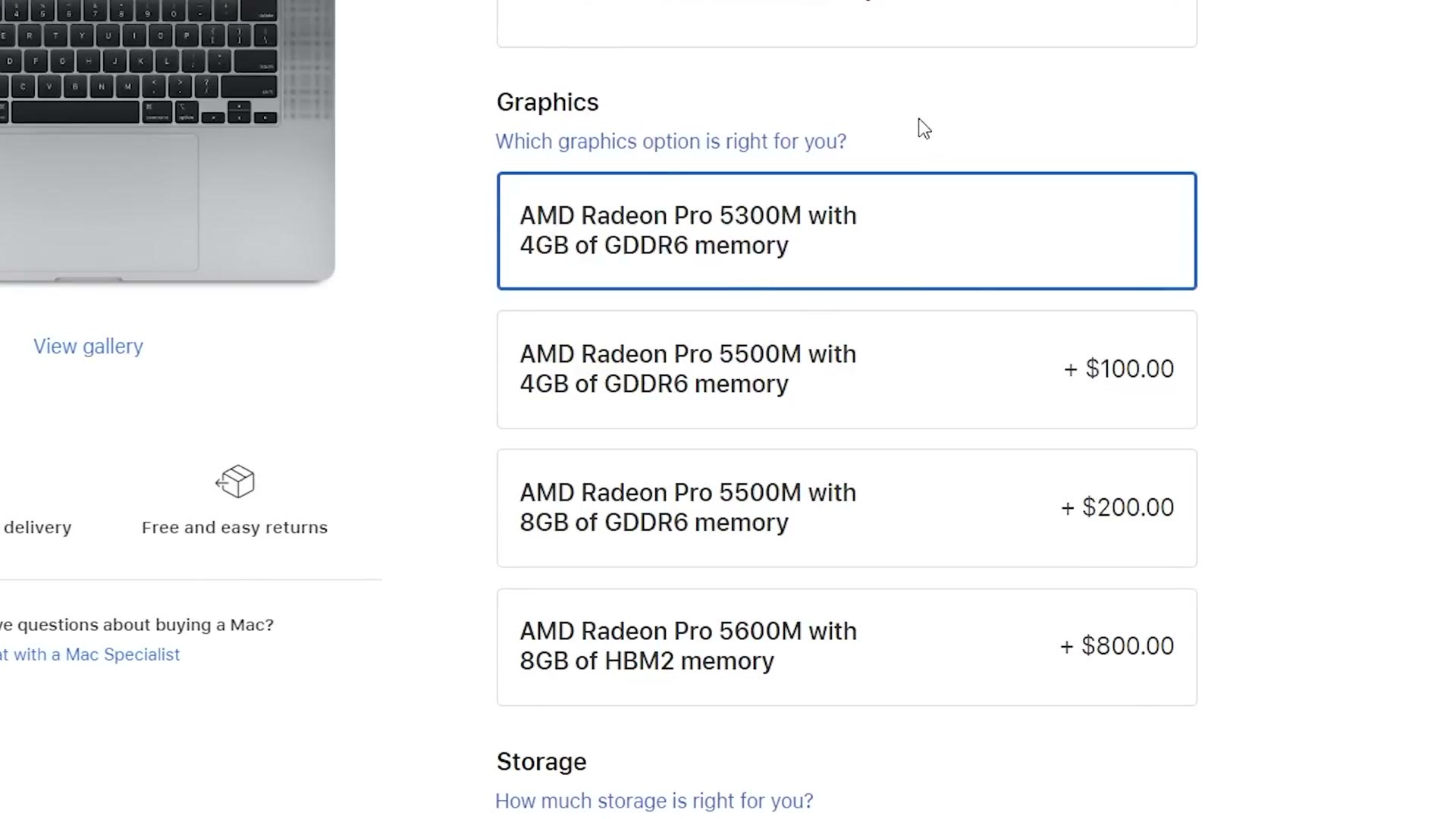
For graphics, from my research, spending $200 to upgrade to the Radeon Pro 5500M with 8GB is a great choice. It isn’t a ton more money, and going from 4GB to 8GB of video memory makes a huge difference when editing 4K.
You’ll also have noticed that $800 upcharge for the Radeon Pro 5600M with 8GB. We’ll come back to that.
For storage, surprisingly, the base 512GB SSD is actually great and that’s what I’d go with. You can upgrade to 1TB if you want, but I think 512 is plenty for the operating system and your programs. Edit your videos off an external SSD, which I guarantee will be much cheaper than any SSD you can buy from Apple.
That’s the budget 16 inch, and I think it strikes a nice balance between performance and price.
The Powerful Build
You’re telling me you want more power. You want the best MacBook for video editing regardless of cost. Don’t just go to Apple’s page and pick every most-expensive option though. You don’t need to do that. Be smart about it.
Starting with the higher configuration, for processor, this may surprise you, but I’d stick with the 2.3GHz 8-core i9 that turbos to 4.8GHz and save the $200 on that upgrade. From my research the difference between the two processors is negligible at best, so put that money toward other upgrades instead.
For memory, 32GB is the sweet spot for 4K editing and multitasking, so you can keep using the laptop while a render happens in the background. If you find yourself editing longer videos at higher resolutions, 4K, 6K or 8K, over an hour in length, talking head interviews and so on, then I’d go to 64GB.
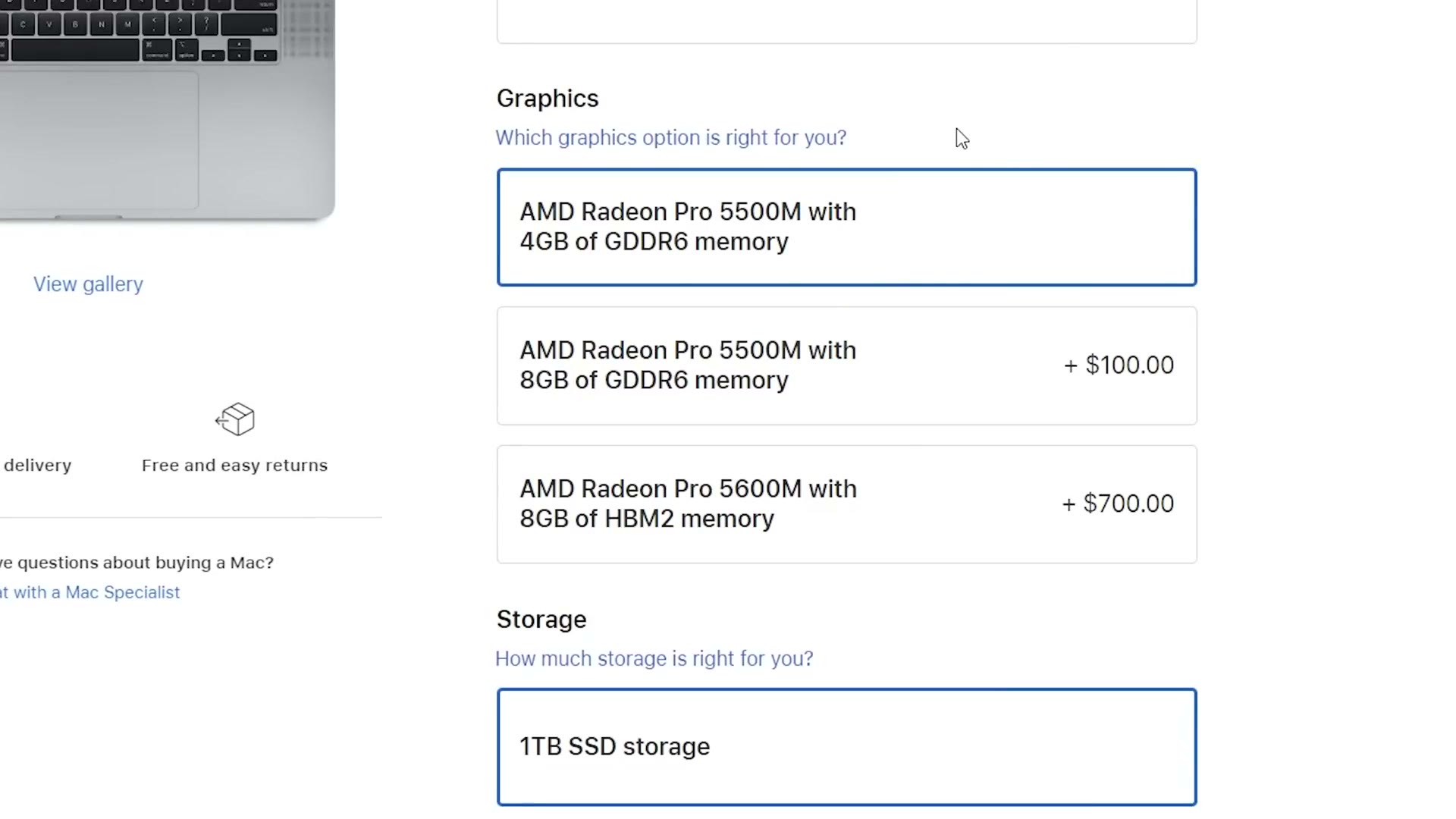
And here’s where it gets interesting. In June 2020 Apple updated the 16 inch, and the only change was the graphics card. A new option appeared: the Radeon Pro 5600M with 8GB of HBM2 memory, at an eye watering upgrade price.
This card ain’t cheap. But if you edit video higher than 4K, so 6K or 8K, or if you edit RAW, this is definitely the one you want. It’ll give you faster, smoother playback for even the most taxing resolutions and codecs.
If you’re just editing plain old 4K 8-bit footage, save your money and take the Radeon Pro 5500M with 8GB. It’ll be fine. But if you’re planning on upgrading your camera or editing higher resolution or RAW video in the future, get the 5600M.
For storage, same logic as before. If 512GB is plenty, 1TB is plentier, so I don’t think the $400 upgrade to 2TB is necessary. Edit off external SSDs.
Or Buy A Windows Laptop
Those are the Apple laptops I’d recommend for mobile 4K editing in 2020. And if you edit in Final Cut, they’re great options for you, because Final Cut is Mac only.
But if you edit in Premiere or DaVinci Resolve, I would highly recommend considering a Windows laptop running AMD’s new Ryzen processors. Some of them will edit video faster than the $3,900 MacBook I just recommended, while coming in under a thousand bucks. That’s such a good value that I’d say you should at least consider it.
And if you’re editing from a desk rather than out of a bag, building your own $650 PC beats all of it on price.
Also, if you happen to be a wedding filmmaker like me, you probably want to book more couples and film more weddings. To help you out with that I’ve created a free guide with steps you can take right now in your business. It’s a free gift to you.