
This is the most advanced audio recorder Tascam has ever made, and it makes timecode easy, with support for more different types of timecode than any company has ever offered.
If you are a filmmaker who can make use of its many features, you are going to love it. But for fast filmmaking and smaller productions, like a wedding, I think most filmmakers are better served by a much more affordable Tascam X8 or FR-AV2.
Minor spoiler for how I feel about this thing out of the way, then. Let’s go through what makes the FR-AV4 so powerful and who should actually buy it.
For the sake of ethics, I want you to know that while Tascam did send me this recorder so I could make this review, I have not been paid by them, and the first time they see it is the first time you do.
You can get the FR-AV4 at B&H.
Size & Build
It is a boxier design, in line with something like a Sound Devices MixPre or a Zoom F6. A form factor a lot of sound professionals will find very familiar, but different if you are used to smaller recorders like the DR-40X or the X8.
Those smaller units are built to be used handheld if you need them to be. The FR-AV4 is really made to be mounted, either to a tripod, sandwiched between the tripod and the camera, or in a sound bag if you need something more portable running a long boom.
Personally I think this design is great for a more permanent setup. If you are consistently recording interviews or videos in the same place every day, YouTube videos, corporate work, a church, that is where a recorder shaped like this makes a lot of sense. You do not need it to be ultra portable, you just need controls that are accessible and easy to use.
Hardware Dials, Yessss
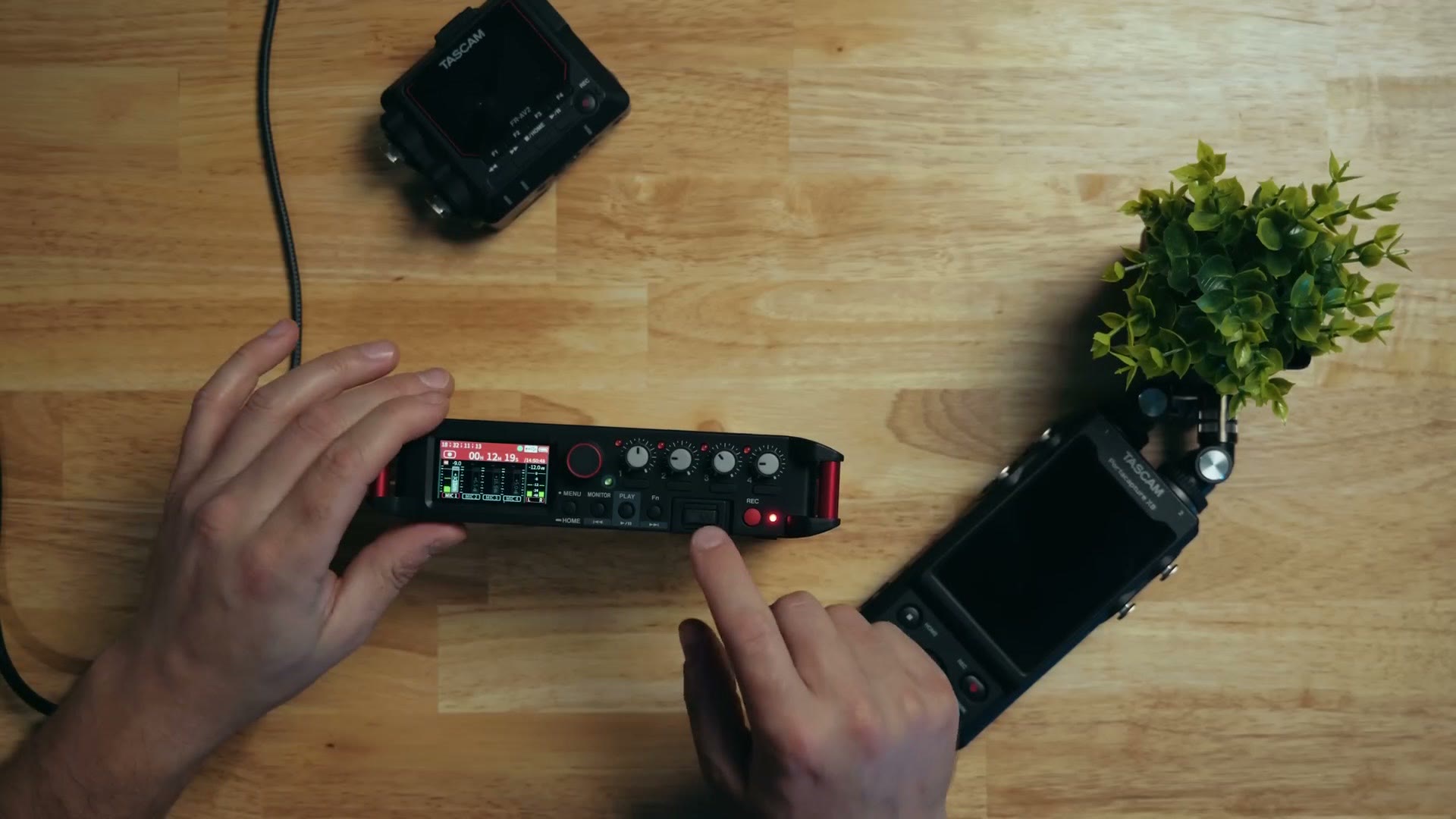
Which it absolutely gives you. This is a big change from the X8, which was dominated by a massive touchscreen and felt like using one of those rugged phones that survives being run over by a truck and has a ten day battery. Hello, can you hear me? That is how the X8 felt, and it was awesome.
The FR-AV4 still has a touchscreen, but it is significantly smaller and actually a bit harder to use, because it is recessed into the frame. If what you are trying to press sits near the edge of the screen it gets fiddly.
Thankfully you barely need it, because Tascam gives you a pile of physical knobs, dials and buttons. Given how often people online complain that everything is a touchscreen now, going back to physical controls is genuinely nice. It feels good to turn these. It is comforting, it is familiar, and it works.
You get individual dials for gain on each input, a main dial to scroll and change settings, a volume knob on the side for monitoring, and several buttons for quick changes. A really well thought out interface.
And of course, despite all those gain dials, this is still a 32-bit float recorder capable of up to 192kHz with very good preamps. So get your levels close with the dials and you still have enormous room in post to push them up or down without noise or clipping.
Bluetooth Control & Monitoring
On the front there is a port for Tascam’s AKBT2 Bluetooth adapter, which is not included. It is an extra $70 at the time of writing, and I have to say that is pretty annoying. Given how expensive this recorder is, I would love to see Tascam just put it in the box.
At the same time it is emblematic of how Tascam does things with all their new recorders. They want you to use a separate adapter. The only good news is that if you already own one, you can move it over, though then your old recorder loses Bluetooth. An optional adapter made sense when Tascam was selling $100 to $200 recorders and keeping the price down. It does not feel that way at this price.
With the adapter in, you get two good features. Tascam’s Recorder Connect app, which controls the FR-AV4 remotely, sets levels and starts and stops recording. And wireless monitoring of what you are recording over Bluetooth, which I am glad to see turning up in more recorders.
Audio Quality
If you are wondering how it sounds, the audio in this video was recorded with a Deity S-Mic 3 running straight into the FR-AV4.
Inputs & Cables
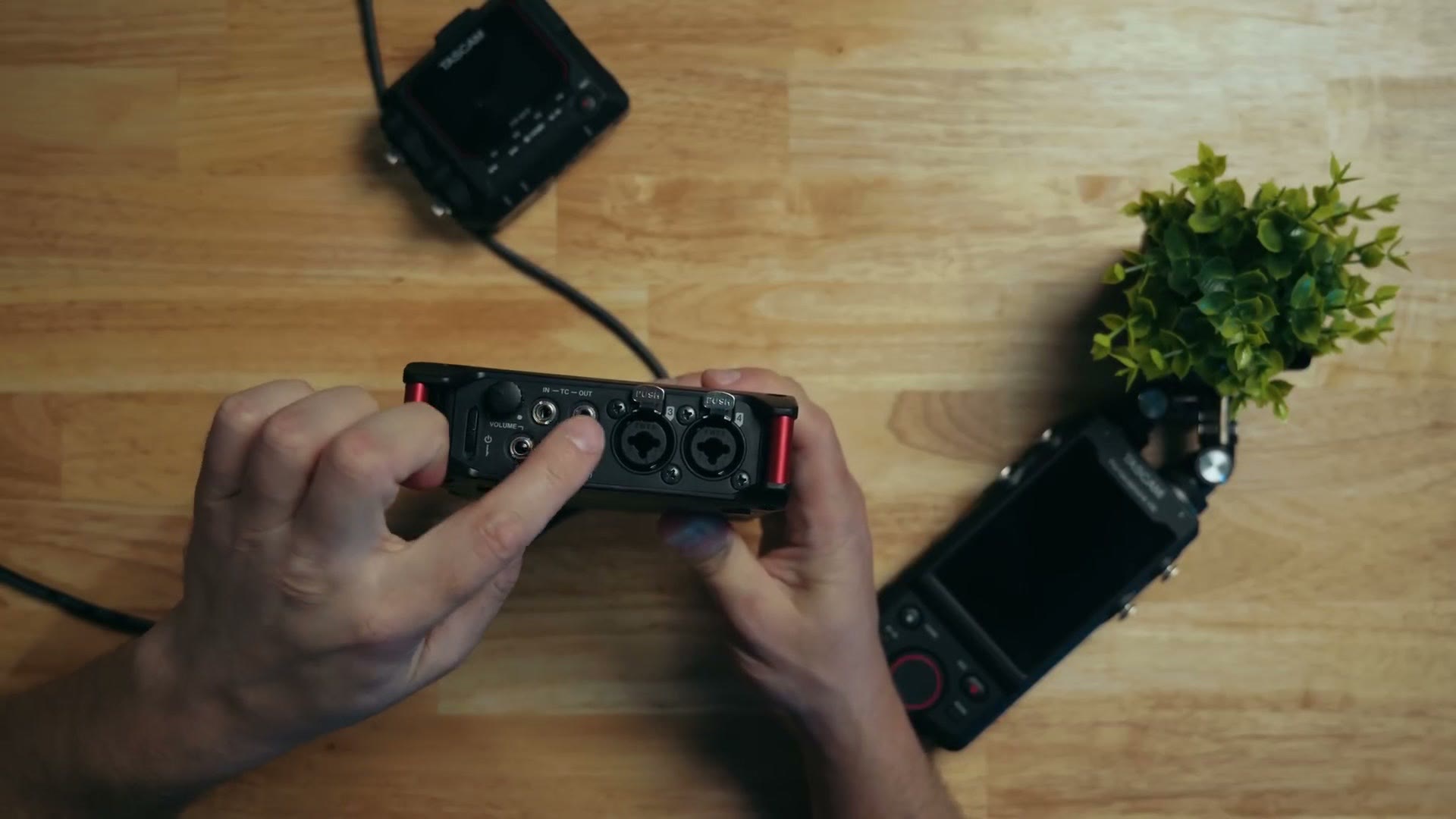
As the 4 in the name implies, there are four main audio inputs. These are combo XLR and quarter inch jacks, which gives you a lot of flexibility. There is also a bonus 3.5mm input you can use to run scratch audio from your camera into the recorder.
On cables: I made an audio pack with my friends at Kondor Blue with the three cables you actually need, including XLR to XLR and quarter inch to XLR, in a carrying pouch and backed by a lifetime warranty.
Power & Battery Life
Round the back there is a battery door holding a caddy for quick swaps. The FR-AV4 runs on four AA batteries, and it can also be powered over USB-C on the side, which is what I did while recording this. That USB-C port also lets the unit work as a 32-bit float USB audio interface with your computer, which is a great extra.
On battery: recording one mic with phantom power on AA lithiums, I got 14 hours and 48 minutes. Not all day, but for the size of the unit and what it does, that is great.
And here is a nice bit of insurance. If your batteries do die, the FR-AV4 performs a rolling save of its audio tracks every 20 seconds, so you keep basically everything right up to the moment it cut out.
HDMI Inputs Add Cool Features
Remember I said this recorder is at its best in a semi-permanent setup, always connected and ready to go? Here is why.
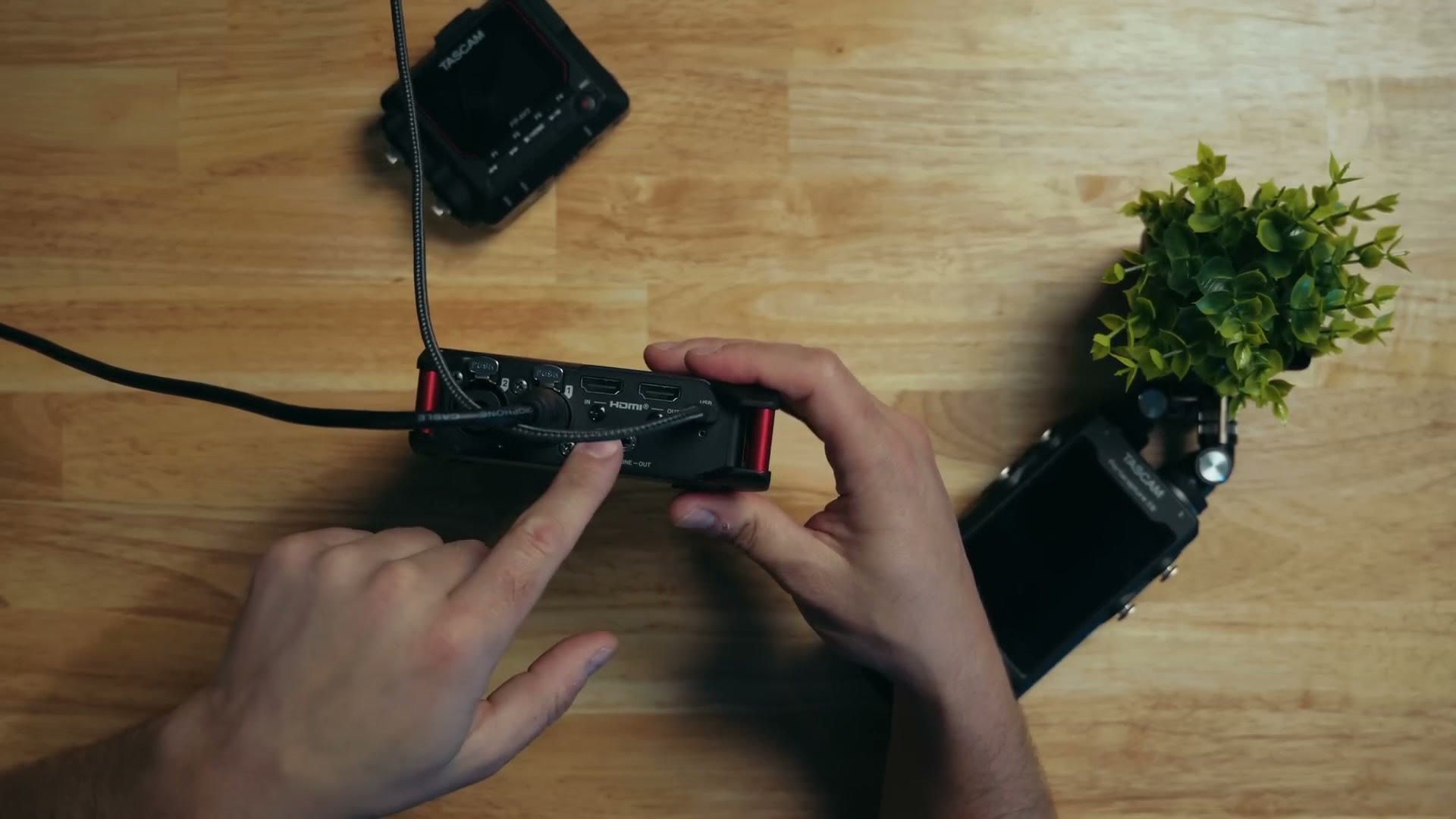
On the side there is something you do not commonly see on an audio recorder: HDMI in and out, with screws for cable locks so they stay put. The FR-AV4 supports HDMI pass-through, and Tascam has done a lot of work with it.
I put together Zoom F3 – Easy To Use & Powerful Audio Recorder For Wedding Filmmaking (Review) as well, which covers the part I skipped over here.
Run HDMI from your camera into the FR-AV4, and it does not matter whether that is a Sony, Panasonic, Canon or Nikon, and you can enable record start and stop sync. The instant you hit record on the camera, the recorder starts too, and stops when you stop. No more remembering to start the audio recorder, which I have forgotten, and I am betting you have too.
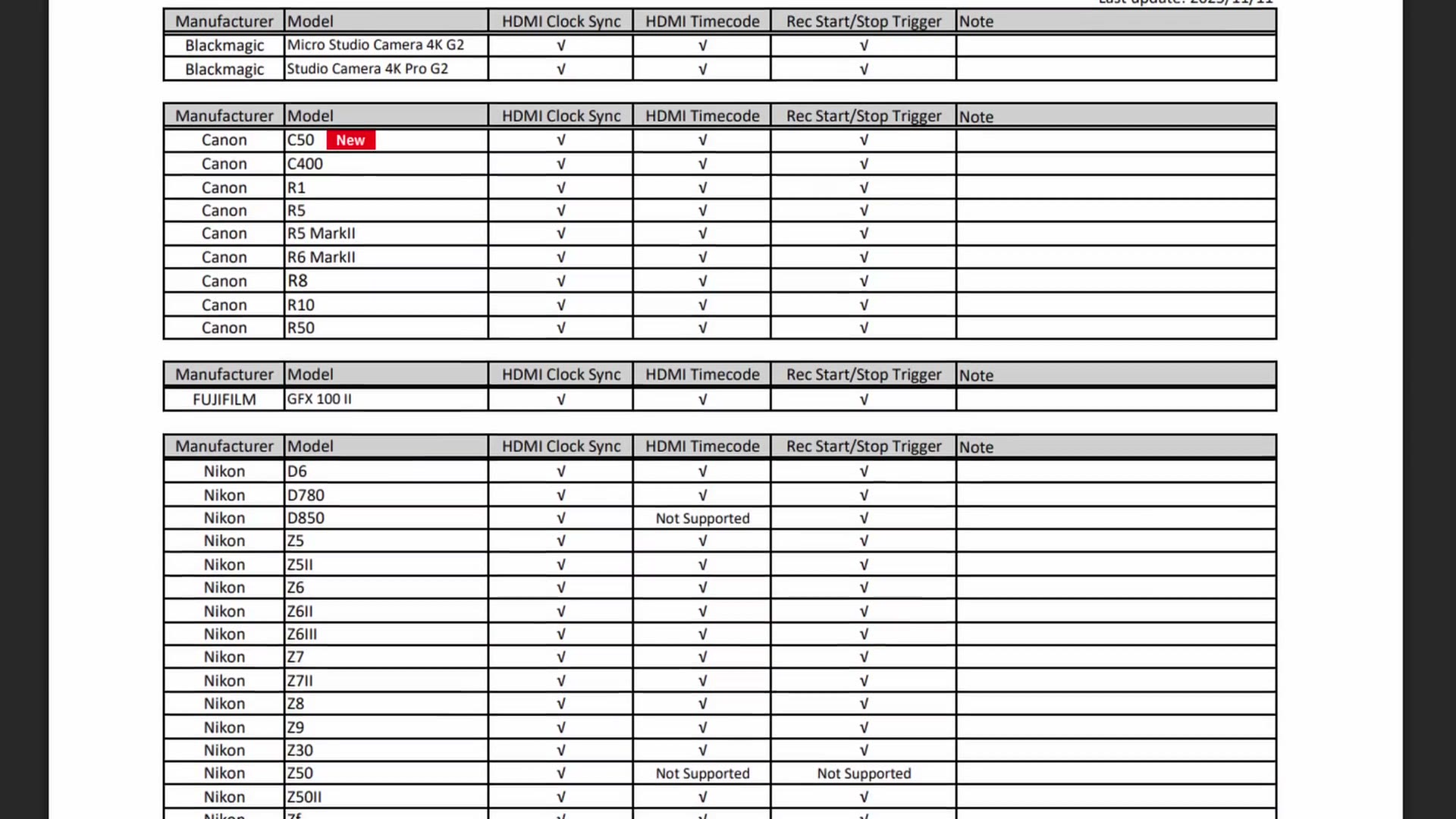
Tascam publishes a full tested camera list, with a column each for HDMI Clock Sync, HDMI Timecode and Rec Start/Stop Trigger. It is a very long list, and worth checking your body against before you buy.
On top of that, if you are running an external recorder like an Atomos, you can trigger that to record as well. A setup where you would normally press record on three things becomes pressing record on one.
INSANE Timecode Capabilities
And now the part I am genuinely most excited about. If you love timecode like I do, strap in.
Like all the newer Tascam recorders, the FR-AV4 supports Bluetooth timecode from Atomos UltraSync devices, as long as that AKBT2 adapter is in. On top of that there is a 3.5mm timecode in and out on the side, so if your timecode gear is from Deity, Tentacle Sync or Saramonic, you can run it in or out of the FR-AV4 and sync everything.
Cool, Matt, but the much cheaper FR-AV2 has 3.5mm timecode in and out too. What makes this better?
This. The HDMI in and out and the USB-C connection all carry timecode as well. The FR-AV4 can be simultaneously feeding timecode to your cameras, your audio recorders, your monitor and your phone, all at once. You can even daisy chain multiple FR-AV4 units and have them all synchronised.
If your timecode gear is from a scattering of different companies and you want it all to work together, this is a really great way to unify it.
As I said though, this recorder is at its best semi-permanently installed in a studio or on a set, where it can stay connected to your mics and cameras with all the HDMI and 3.5mm timecode cables run. It is some work to set up and I would not want to do it every day. Once it is built out, that is where it shines.
Should You Buy The FR-AV4?
The price will probably make you stop and think, because Tascam has the FR-AV4 at $1,000 at the time of writing, against something like the X8 at $400.
For most filmmakers I would look at the X8, or the FR-AV2, or if we are talking competition, maybe even the Zoom F3. All of those are far more affordable and still very capable, and I have reviews of every one of them.
But if you work with timecode constantly, and you want the benefit of HDMI running through your audio recorder so your audio and cameras sync themselves, and you want frankly extreme levels of timecode support, that is where I would heavily consider the FR-AV4. It is doing things no other audio recorder has done.
My free Filmmaker Gear Guide covers the rest of what I recommend, and those Kondor Blue audio cables are excellent.