
This is the cheapest video editing laptop you can buy today. It is also the cheapest laptop Apple has ever made, coming in as low as $500 with an education discount, or $600 if you are not in school anymore, like me.
So with a price that low, how does it handle creative work? I am going to review the MacBook Neo purely from the perspective of a video editor and tell you whether it is a good buy if you want an ultra low budget machine for creative work.
For the sake of ethics, I want you to know this is not paid for or sponsored by Apple, and I bought this laptop with my own money.
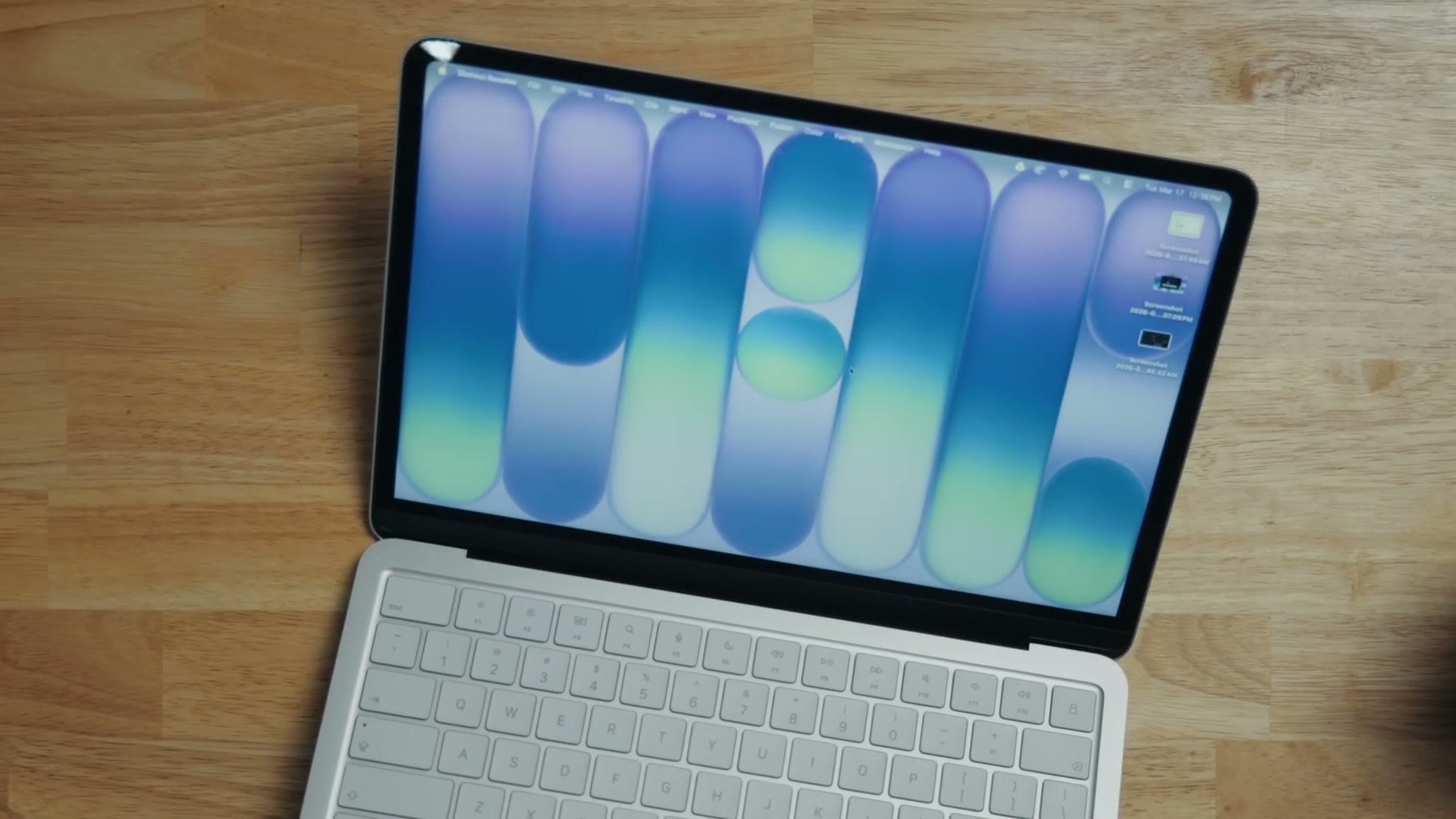
Compromises Apple Made To Hit The Price
Apple had to give some things up to get here, and some of them will not bother you at all while others land directly on video editors.
The little ones: the keyboard is not backlit, Touch ID is a $100 extra, the haptic trackpad is replaced with a mechanical one, and there is no MagSafe. All minor, and all completely forgivable at this price. I noticed they were missing when I went looking for them, but none of it was a dealbreaker. This still feels like a high quality MacBook. It feels premium, and far nicer than the vast majority of $600 laptops you may be used to.
Screen Quality & Color Accuracy
The screen is genuinely fantastic. It is a 10 bit panel and it is very color accurate. It does not offer the same DCI-P3 coverage as other Apple laptops, but when I put my Spyder calibrator on it, here is what came back.
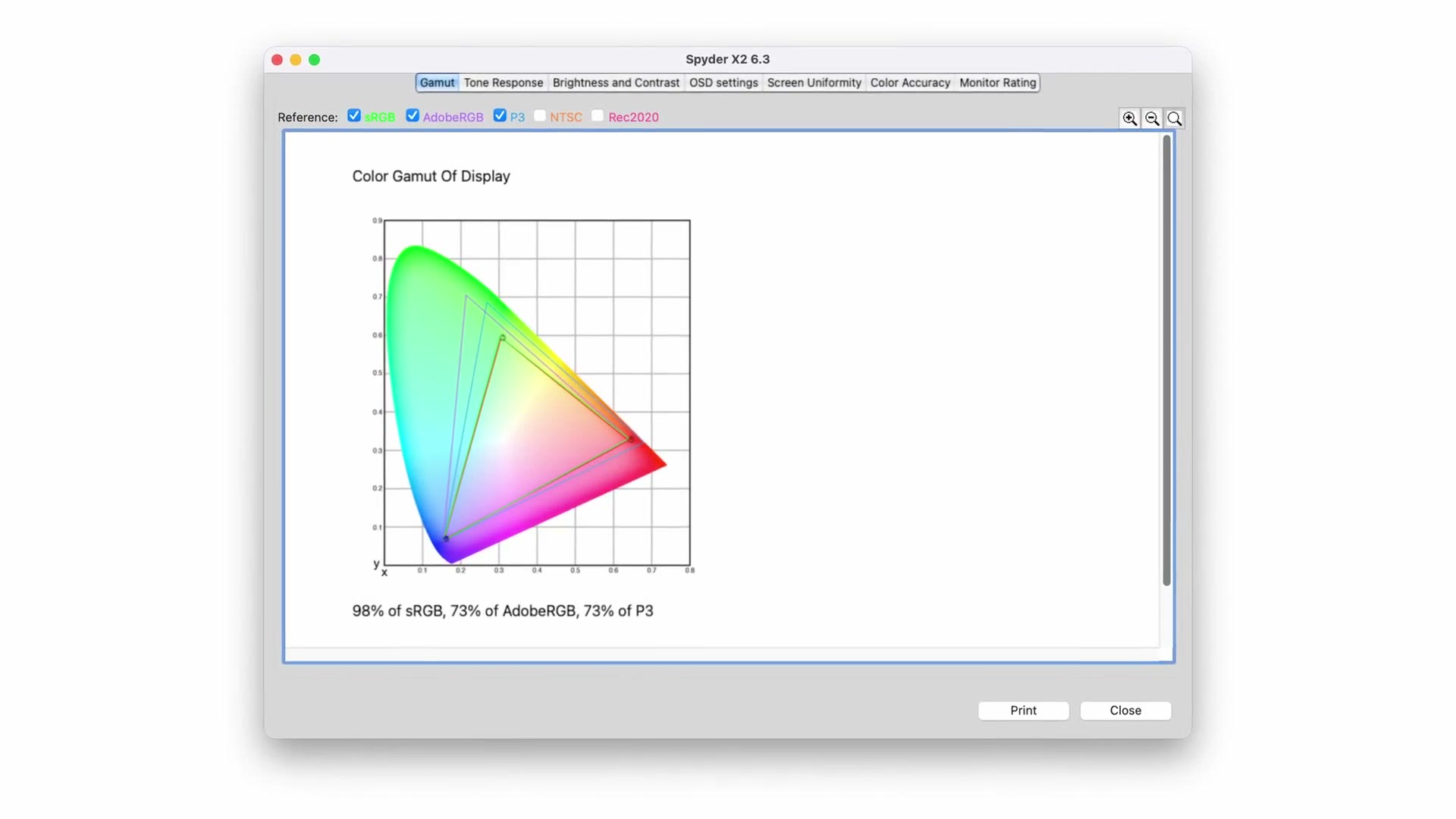
98% of sRGB, 73% of AdobeRGB and 73% of P3. That sRGB number is great, and very usable for grading video.
The Ports Are The Real Compromise
Where you may struggle to forgive Apple is ports, memory and storage. Ports first.
Like the MacBook Air, the Neo has two USB-C ports on the side. The difference is that neither of them is Thunderbolt. One is still quite fast, USB 3.1 Gen 2 at 10Gb/s. The other is limited to USB 2.0.
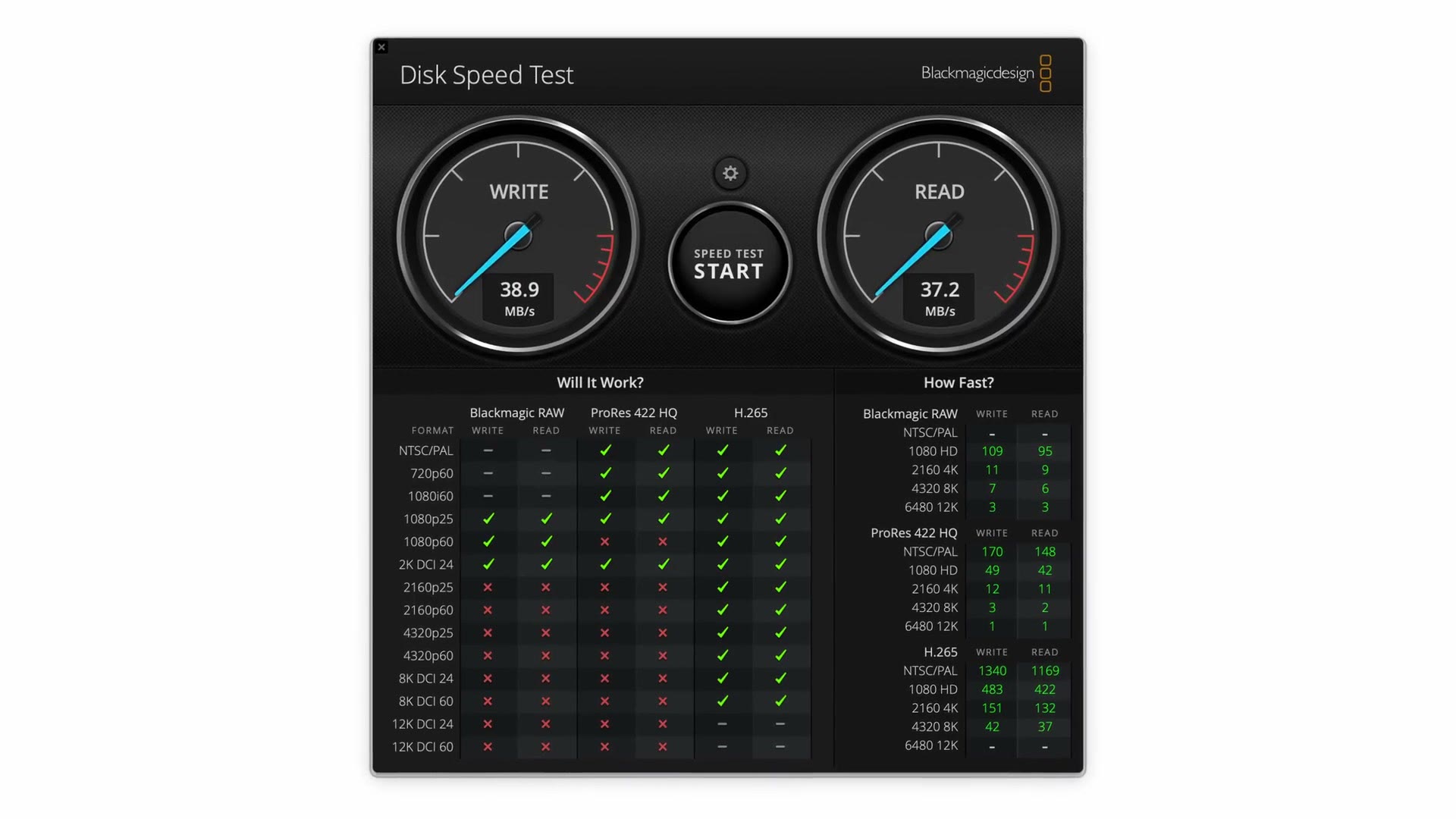
That is a Blackmagic Disk Speed Test on the slow port. 38.9 MB/s write, 37.2 MB/s read. It is really only good for charging, and I would not use it for moving files. Thankfully the MacBook does warn you with a pop-up if you try.
So if you were planning to plug two external drives into both ports and copy footage from one to the other, do not buy this laptop. It will take forever.
It also shapes your workflow in an interesting way, because your best bet is to put your SSD on the rear port and charge from the closer one.
SSD Size, And Why You Need An External
You are definitely going to want an external SSD, because the Neo only offers a 256GB or 512GB internal drive.
Keep in mind the operating system and your editing software will take 20 to 40GB or more. So you are looking at a little over 200GB free on the base model, or about 450GB on the upgrade.
Even if your projects are only 50 or 100GB, you want plenty of headroom for the temporary scratch files your editor generates, and for swap memory, which is where the MacBook uses the internal SSD as virtual RAM once actual memory fills up.
The 8GB Memory Limitation
And fill up it most likely will, because this laptop is limited to 8GB of memory. That’s it. There is no way to upgrade it short of buying a completely different laptop like a MacBook Air, for a lot more money.
In fairness, it was not until the M4 series that Apple started including 16GB as the base option. And 8GB is not a problem at all for browsing. But for video editing it should give you pause, because I have said in a lot of videos that 16GB is the bare minimum I recommend.
Which is the whole point of this review. Maybe Apple worked some magic. Maybe it works anyway.
Video Editing Performance
For context: I bought the absolute base model, with the smallest 256GB SSD.
I fired up DaVinci Resolve and loaded a project I have used to test other MacBooks and Windows PCs, and this little laptop genuinely surprised me. Remember it is running the A18 Pro chip from the iPhone 16 Pro, and that chip has an impressive amount of video hardware encoding and decoding: encoders for H.264, H.265, ProRes and ProRes RAW, plus an AV1 decoder, which matters more every year.
Playing back footage, scrubbing the timeline, making cuts as I went:
- 4K at 24 to 60fps from Sony bodies like an a7S III or FX3: handled easily. Very smooth on the timeline, which is really impressive.
- 6K, especially Open Gate: here it starts to struggle a little. It still plays back smoothly, but takes about half a second to load clips before playback starts. My M4 MacBook Air loads any footage basically instantly.
That said, playback on the timeline is still incredibly smooth at any resolution or aspect ratio. And I have tested PC laptops in the last couple of years that cost ten times this and also struggled to scrub 6K Open Gate, especially on battery.
So if you are on a budget and $500 or $600 is what you have, do not let the 8GB of RAM stop you. You can easily edit video with this laptop, which feels like a crazy thing to say given what decent performance used to cost.
Export & Render Speeds
Exporting is not something you do all day, so it matters less than editing speed in my opinion, but it is still worth knowing, and it is the easiest way to compare machines because the software tells you the exact time.
I took a Resolve project with a mix of 4K and 6K footage in a variety of aspect ratios, including Open Gate, and rendered it out in 4K at 50Mbps, which is what I recommend for YouTube.
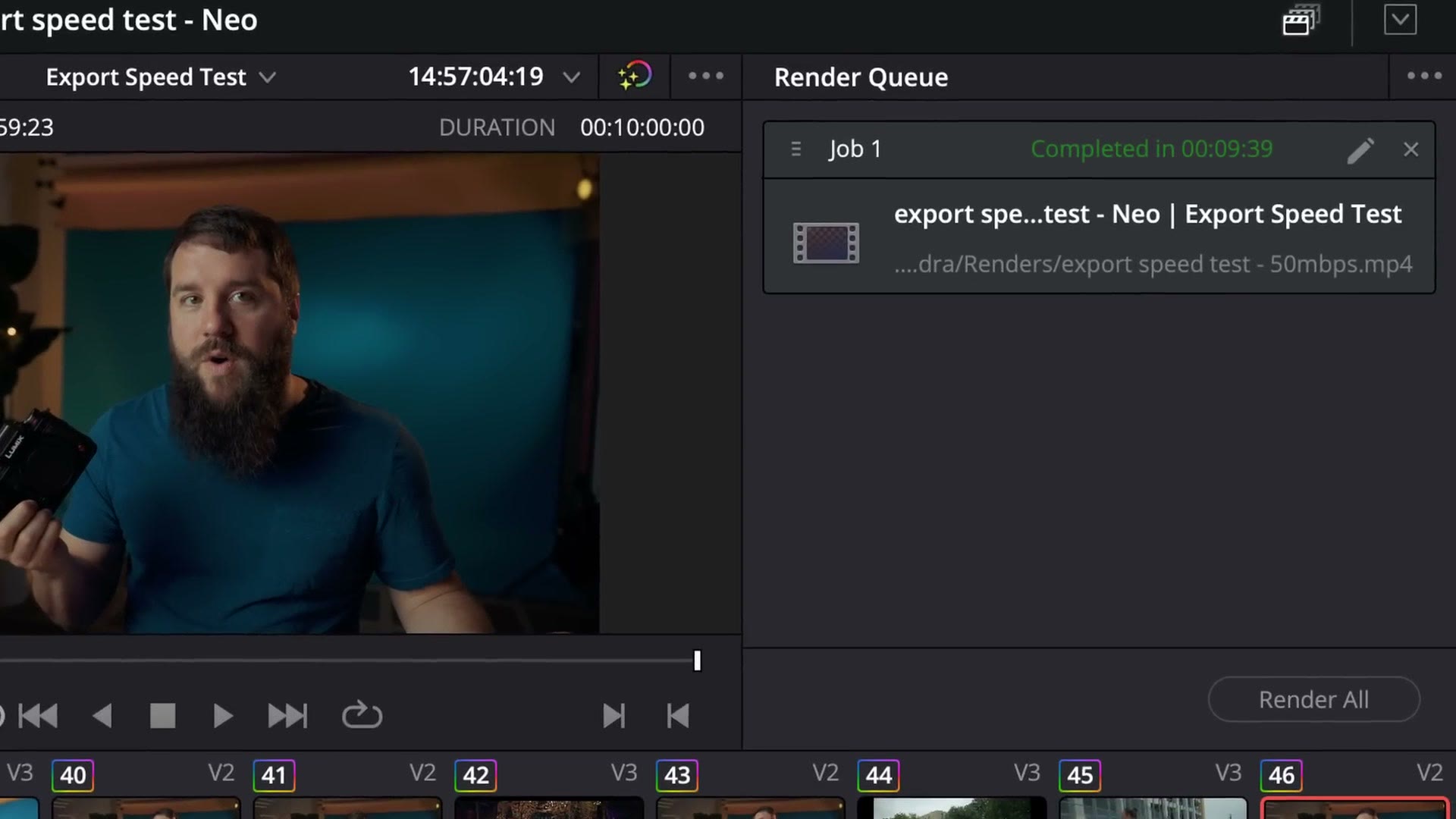
The MacBook Neo did it in 9 minutes and 39 seconds.
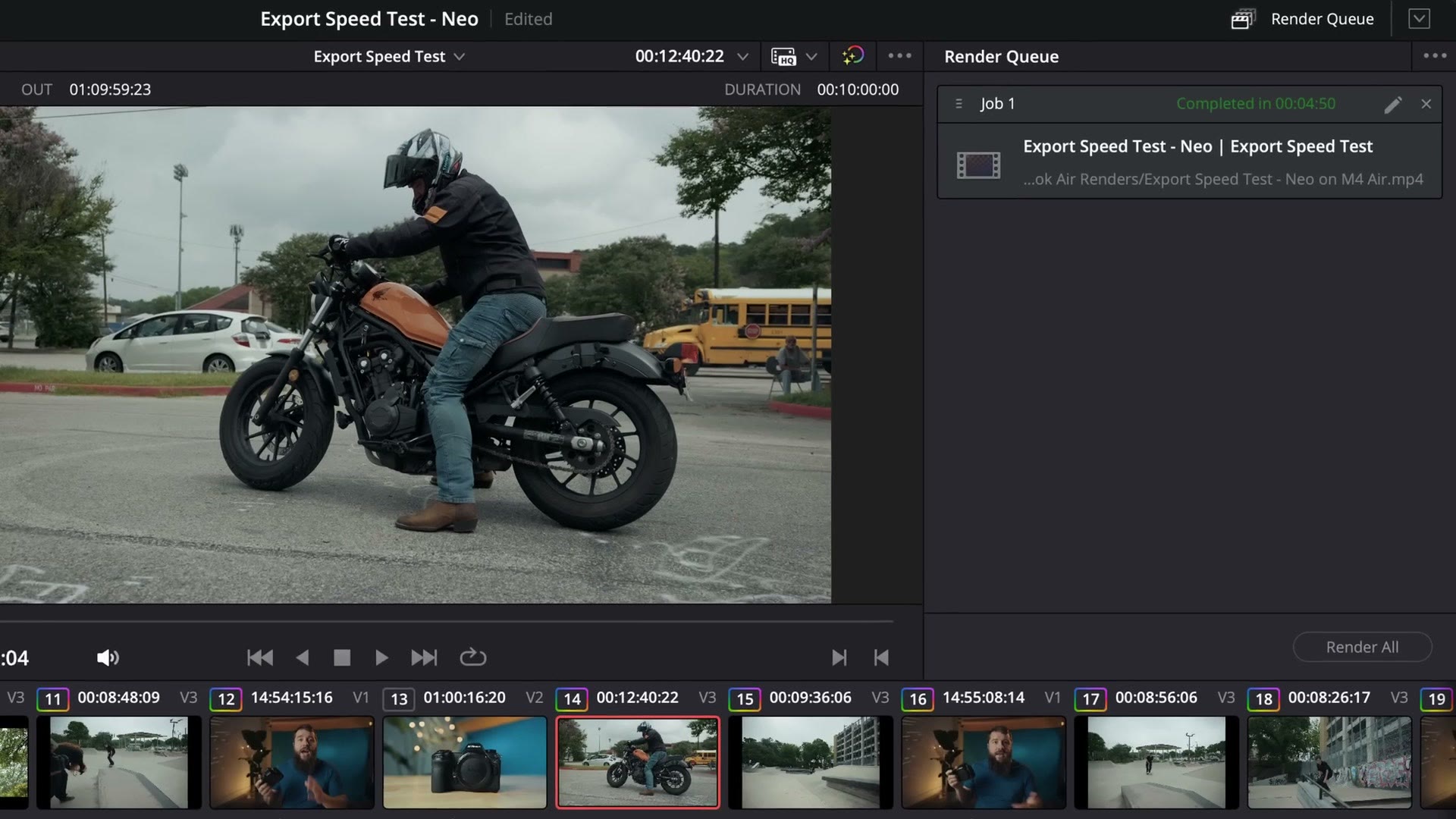
My M4 MacBook Air did the exact same render in 4 minutes and 50 seconds. So the Neo took almost exactly twice as long.
But I have been editing for a long time and I am very used to renders taking far longer than that. Hours. I remember plenty of nights exporting overnight and praying the machine had not crashed by morning. Seeing the Neo take under 10 minutes for a 10 minute video is still extremely impressive for the money.
If you are fine waiting, this works. If you are not, look at a MacBook Air or Pro, which will play back and render faster and cost more. We are focused on the extreme budget end here.
Fan Noise, Speakers & Heat
This is where it gets funny, because like the MacBook Air, the Neo has no fan. So there is no fan noise to interrupt your audio. Side note: the new side-firing speakers sound pretty good, especially for the price. I would still use headphones for editing where possible.
Heat is more interesting. Normally a fanless laptop runs warmer. But remember this is a phone processor, and a phone is a very small, thin slab of glass and aluminium that can only cool passively. The Neo is also passively cooled, but its thermal envelope should in theory be much larger, letting Apple push the chip further than an iPhone ever could.
That is the theory. In practice it looks like the chip throttles itself a fair amount to keep temperatures down, a bit like it still thinks it is in a phone. Which does make me wonder whether this laptop could be modded for better cooling and more performance.
Battery Life
Apple claims 16 hours on the Neo versus 18 on the Air, but it is more complicated than that for us.
Editing with nothing plugged in, I would expect around 10 hours. But as we covered, you really need an external SSD because the internal storage is so small, and running an SSD takes a big bite out of that. Five to six hours instead of ten.
So if you genuinely want to edit on the go, get the 512GB model. And here are the external SSDs I recommend if you go the other way.
Should You Buy The MacBook Neo For Video Editing?
I have made a lot of videos over the years about building budget editing PCs and finding the best value Macs, and the Neo at $600 genuinely surprised me. There has never been a new laptop that edits video this well at this price.
Sure, you could find a refurbished M1 MacBook Air cheaper, or risk something used, or waste your money on a $500 HP with a grossly underpowered Intel CPU. But step back and look at price to performance and the Neo is, in my opinion, the new budget king.
It has compromises. All cheap laptops do. Apple just made the right ones here, and the result still edits 4K at $600, or $500 if you are a student, which is crazy.
This laptop makes video editing accessible to a lot of new creators who could never have afforded a higher end machine. If you want to make videos on a very low budget, a MacBook Neo is one of the best ways to start.
If you want to get better at the editing itself, my Edit Videos Like A Pro guide covers the biggest rules I follow, and it is completely free. I also have a whole playlist of export tutorials if you want the best settings.